<?xml version="1.0" encoding="utf-8"?>
<feed xmlns="http://www.w3.org/2005/Atom">
    <id>https://pradeepkg.github.io/RSA/pam/</id>
    <title>Developers Blog</title>
    <updated>2026-03-06T00:00:00.000Z</updated>
    <generator>https://github.com/jpmonette/feed</generator>
    <link rel="alternate" href="https://pradeepkg.github.io/RSA/pam/"/>
    <subtitle>Developers Blog</subtitle>
    <icon>https://pradeepkg.github.io/RSA/img/iconmonstr-arrow-31.svg</icon>
    <entry>
        <title type="html"><![CDATA[BeyondTrust Password Safe]]></title>
        <id>https://pradeepkg.github.io/RSA/pam/beyondtrust/</id>
        <link href="https://pradeepkg.github.io/RSA/pam/beyondtrust/"/>
        <updated>2026-03-06T00:00:00.000Z</updated>
        <summary type="html"><![CDATA[BeyondTrust Password Safe is an enterprise solution for privileged account, credential, and secrets management. It automates password rotation, enforces strong security policies, monitors and audits privileged sessions, and manages access for human and machine identities across traditional, cloud, and DevOps environments.Versions: 8.0.0 P10]]></summary>
        <content type="html"><![CDATA[<table><tbody><tr><td width="180" class="image-cell"><img src="data:image/png;base64,iVBORw0KGgoAAAANSUhEUgAAALQAAAC0CAYAAAA9zQYyAAAACXBIWXMAAA7EAAAOxAGVKw4bAAAEumlUWHRYTUw6Y29tLmFkb2JlLnhtcAAAAAAAPD94cGFja2V0IGJlZ2luPSfvu78nIGlkPSdXNU0wTXBDZWhpSHpyZVN6TlRjemtjOWQnPz4KPHg6eG1wbWV0YSB4bWxuczp4PSdhZG9iZTpuczptZXRhLyc+CjxyZGY6UkRGIHhtbG5zOnJkZj0naHR0cDovL3d3dy53My5vcmcvMTk5OS8wMi8yMi1yZGYtc3ludGF4LW5zIyc+CgogPHJkZjpEZXNjcmlwdGlvbiByZGY6YWJvdXQ9JycKICB4bWxuczpBdHRyaWI9J2h0dHA6Ly9ucy5hdHRyaWJ1dGlvbi5jb20vYWRzLzEuMC8nPgogIDxBdHRyaWI6QWRzPgogICA8cmRmOlNlcT4KICAgIDxyZGY6bGkgcmRmOnBhcnNlVHlwZT0nUmVzb3VyY2UnPgogICAgIDxBdHRyaWI6Q3JlYXRlZD4yMDI1LTA4LTIxPC9BdHRyaWI6Q3JlYXRlZD4KICAgICA8QXR0cmliOkV4dElkPjlhNTg3ZmI2LTY3YTctNGZlZi1hOGY3LWI0Mjg0OTNhN2E2MDwvQXR0cmliOkV4dElkPgogICAgIDxBdHRyaWI6RmJJZD41MjUyNjU5MTQxNzk1ODA8L0F0dHJpYjpGYklkPgogICAgIDxBdHRyaWI6VG91Y2hUeXBlPjI8L0F0dHJpYjpUb3VjaFR5cGU+CiAgICA8L3JkZjpsaT4KICAgPC9yZGY6U2VxPgogIDwvQXR0cmliOkFkcz4KIDwvcmRmOkRlc2NyaXB0aW9uPgoKIDxyZGY6RGVzY3JpcHRpb24gcmRmOmFib3V0PScnCiAgeG1sbnM6ZGM9J2h0dHA6Ly9wdXJsLm9yZy9kYy9lbGVtZW50cy8xLjEvJz4KICA8ZGM6dGl0bGU+CiAgIDxyZGY6QWx0PgogICAgPHJkZjpsaSB4bWw6bGFuZz0neC1kZWZhdWx0Jz5CZXlvbmRUcnVzdCAtIDE8L3JkZjpsaT4KICAgPC9yZGY6QWx0PgogIDwvZGM6dGl0bGU+CiA8L3JkZjpEZXNjcmlwdGlvbj4KCiA8cmRmOkRlc2NyaXB0aW9uIHJkZjphYm91dD0nJwogIHhtbG5zOnBkZj0naHR0cDovL25zLmFkb2JlLmNvbS9wZGYvMS4zLyc+CiAgPHBkZjpBdXRob3I+UEs8L3BkZjpBdXRob3I+CiA8L3JkZjpEZXNjcmlwdGlvbj4KCiA8cmRmOkRlc2NyaXB0aW9uIHJkZjphYm91dD0nJwogIHhtbG5zOnhtcD0naHR0cDovL25zLmFkb2JlLmNvbS94YXAvMS4wLyc+CiAgPHhtcDpDcmVhdG9yVG9vbD5DYW52YSAoUmVuZGVyZXIpIGRvYz1EQUdWRXRTZTlJayB1c2VyPVVBREo3aW5tamlJIGJyYW5kPVBSRUtTSEEgSkFJTiYjMzk7cyBDbGFzcyB0ZW1wbGF0ZT08L3htcDpDcmVhdG9yVG9vbD4KIDwvcmRmOkRlc2NyaXB0aW9uPgo8L3JkZjpSREY+CjwveDp4bXBtZXRhPgo8P3hwYWNrZXQgZW5kPSdyJz8+hE3iVwAAES9JREFUeJzt3XmcU9Xdx/HPXbLNgIKAglAWNwQVRIWKiiKK8qh1QVzaKq5UVJSXPmCrdalYsago7talovhYUbTaByyLAoICZXdYpCAiig6yM8wkk9ytf9yZzITMjATDJJz5vf/i5i75JfPl5OTce080z/M8hFCEnusChMgmCbRQigRaKEUCLZQigRZKkUALpUighVIk0EIpEmihFAm0UIoEWihFAi2UIoEWSpFAC6VIoIVSJNBCKRJooRQJtFCKBFooRQItlCKBFkqRQAulSKCFUiTQQikSaKEUCbRQigRaKEUCLZQigRZKkUALpUighVIk0EIpEmihFAm0UIoEWihFAi2UIoEWSpFAC6VIoIVSJNBZYK+ch+fYuS5DIIH+2aylnxL9y3Uggc4LZq4L2J9ZS2cSGz0YbCvXpYgKEui9ZC2ZQWz0zeBImPOJdDn2grXwYwlznpJAZ8haOI3YmFslzHlKuhwZsJd9RuzJW8F10ld6Xv0XJNJIC52BxJRxNYdZ5A0JdCbq6mZoWv3VIWolgRZKkUALpUiga+GsLcpsB/lSmBck0DWwls4kOubWzHaSPnRekEDvxloyg9jjcjp7fyWBrkbOAO7/JNAV5AygGuRMIWAtmEpszBA5aaKABt9CW4s+yU6YZZQjLzT4Fjr+zhNZaZmdlfMgFMlCRanMzidn/Zgqa/CBJlGelcNEH70xK8fZXeNxq9DMwD45tooafJdDqEUCLZQigd7PWHMn4ZWX5bqMvCWB3s/YK+cRfeRavFhprkvJSxLo/ZCzejHRR66RUNdARjkyEDjtIozDu2b9uImp4/B2bd+jbbWKi6CcNUuJjryGgrvHohU0znpN+ysJdAYCp160T45rr5iLs2rBHm3rVTuB43y1lLKRAym85w0JdQXpcuzn3LVFlD30W7yyklyXkhck0HlO2+06692XAdxvVhAddX19lZTXpMuRAbdkG8SjWT2mt2s7bvG6n30cZ80SnOJ1GK06ZKGq/ZcEOgPlLwzDXvppvT6n53louy3XSiaMlC6HUuQ2MAl0vqupzyxqJ4EWSpFAC6VIoIVSZJQjS/R2nTDadc54P2/Xduwl0zPYo44+tdwGJoHOloI/vIbepMVe7Vv2x4txvl62h1tLaOsiXY4s+Vm3SQVCWSpCRkQk0PlOkz9RJuTdyne6/IkyIe+WUIoEWihFAi2UIoEWSpFAC6VIoIVSJNBCKRJooRQJtFCKXJyUJfbi6RidemS8n7drO+7Gb/Z4+zrvYJGr7STQ2RJ7YXi9PE+dN8nKxUnS5VCKtNAS6Np4ZTvTHyw4oP4LERmRQNd2B4iVSAu1edQJ9VCP+Dkk0KFwravs5XNSlgN9rkBv2W5fV7T3pA8tgdYPbF7rOmv2BynLWiBEwV2vorfrtK/LqoOMctSlwY9y6IceDkWza1xnL/oYZ91yjA7HVm3fqgOFD3+IPf9fOF99gVdaQ187A5nfJCvq0uADbXTqDpPH1ro+9uLvKRwxAa3abxBqhkGg5wUEel6QlRrK7u2Ps/aLPdq21l5FqAD9oJZZqWd/1uC7HGaXXnX+YKb77SpiT9+Ol6XfM6xRILjHm9Y2Dh2+YYRMeo4EGi1cSOC0umfmtxdPp+yBy3C+2rNWtF5pOuFbRhPsdUmuK8kLDT7QAKELB/9kK+l+s5Ky+/pTNuLXxCe9grO2CK90R3YKiMf2eNOUU9+aTuSWxwj2ujg7dSigwfehAfSDf0Go/23Ex4/+yW2dL+fjfDmfeD3UVZNkl0PXidz6JIFTstOPV4W00BWCF96Esb+cONF1IkPGSJhrIIGuoOkGBcNfRm99RK5LqZNmmERue4pAz/NzXUpe0rw6L99qeLyyEmLPDMX+YlauSwHggL+vTVn24rGUIUSRSlro3WiFB1Dwh9cIX/cnCBXkupw0Eua6SQtdB2/XdhIzJ2DNeBu3+Juc1LB7Cy3qJoHeQ863q3BW/hvnu9V423/EK8/uz7vVSDcovHfcvn8ehUighVKkDy2UIoEWSpFAC6VIoIVSJNBCKRJooRQJtFCKBFooRQItlCKBziF38/ckpo8nOuY27P8synU5SsjJqe/YC3elP6jraAc2R2/VgUCPc9Eijeq7rHpXcn0XiJUBUHD3WOwVc/F2bMn4OMGLBmMceli2y9sv5eQWLGvWe3Wuj497mPDvRhLo0a+eKsoP9vwpGU2tWynQewDkKNBeWQn2stnYyz4nMmhkTmqoLi+7HF7ZTmLP3om7aUOuSxF1cIrXsWvQicSeuh1r+vhclwPkwU2yBfe8gXncqXixUuzF04k9d6c/pZUVx5o/mdAFN+a6xHoTPHdg2p3k9oq5OKsW+AuhCKELBqXtpzdvXR/lpXMs8NzcPHctch7oSlqkEYFTLyTx0Ws4XxcB6VPauhvXk5g6rmIKru1oTQ/BPPYUgv2uRYsUUv7uGLwtPwCgH3YsoXMHpuxvL59TNV+dYRK+4SE0w8BeswTr0/dwi78GD9ANjA7HEDz7N+iHtE3uby2chvPVUrwtxZg9z8fs0ovExJexF32CF49htO1IaMBQ9FYdUuveuQVr5rs465aDbWO070yg72/T3oNgv2vS3xjXSQZaCxcSGjA0ZbVXuoPE9PF424pxt22i4M7n8awEiUmvYC/7jPDA+7GLZuFu+AoA86S+BLr3Te7vrC0iMfVN//iNmhC++h7/aUu2Ys3+EGfFHP/ab9PEOLwrZrfemEedSPn40bgb1qTU4k/67k+zoLc+gtCFv0t/PftY3gQawCuP4m79IblsVJsU0Voyk9iYW6H6DEbF63BWziMx810K73kdLVxIorJ/Pn8ywTMGoIWrbqNKfPQ37CUzADC7n4NmGJSPH03ig+fTanFWzCExeSyRwY8SOPVCf/8pb+BUzEiqt+9MdOLLVa0n4G5Yjb3sMwpHfYTe9GAA7FULiD46CGK7ktvZiz4mMXUcJH7+ZAjuto3E//6ov2AE8OwE0VE34Kzw63Q3foNdNLuq7hatoVqg3S3fJ7/TaM1aEb76HpyvlxMdeTVeWUnqe7LscxIfPE/4plHYC6elBdqa9X7y38YxPXMS6Jz3oe2i2SQ+fY/4pFcpe/BKvJ3+t3yj40mY3c8B/L5a7KkhyTCbPfoRvPAm9DZHAuBt+o7Y88MJ9rm8alqv8jKseZOSz+Pt2p5y42vwrCuJ/+u11DAHw2jNW4NW8bbYFrHnh2FXC22lxD+eTQlz9edJTH4dAHfLD8QevyklzNW3w7H39G3aY/FxI5NhBvBipRkfo3zsn5JhNrudSfDimzF79EMrPNDfwLGyUuu+kPMWOjHx5bTH9DZHUjDsr2iGX15iwpjk7ELBi28hfMX/AuD1v43SYefibfkeZ/Ui3I3rCfS6BOvjtwCwZrxDsPdl/r/nTATXAUBr3hrjsC5Ex9yWfE7z5POIXD8CrXFT3OJ1RJ+4BXfDanAd4m+NwhwxIbXIYITIjQ9j9uiHt+lbok/cnGyxnJXzAIi/93RVtylcQPi6B/3W3rawF35M7MXhYGcxHI7lt/yGidGuE9rBbdGbZT6BY/WJIyODR6Ed0AwAz7aw506EcCGNHpuMs2ENZcOrRqLy4f7HnLfQNXE3rKH0notwi9fhOTbWok+S6wInno27eQPu5g14JVsxjz8juc5eOS+lH+qsXoxTETLr8w+Tjwf7XI79xadQ7o8Ba80PJTLkSbTGTQF/ytyCO56rOs6aJbjbNqbUGDzrSgI9z0czDPRWHQhW6xO7FZ8y9sJpyccig0YSPL0/mmGihSIETv1VRpM07imzSy8aPT6Fwoc/oGDo05jHnZbxMbRqs5iW3nE25X97AOvfk6E8SqDXJQQqPjnzUc5b6OQoR6Ic5+tllP/197gb1+Nt3kDspbuJDH0mZe63svv613osb8dmjNZHYHbphV0x57M14x20c67CWbPE30jXCfS+DGtmVYtrHHVS8tOgkn7oYWhNWuDt2AyA++O3db4OrfFBVQuug1e6I2XEwuzWp+43otYXldl5r8jQZzKbhbSGw4cH3k/s2aGQiONFS0hMexOmvQmBEMFzriJ02R15O51CzgNdSQuGMY/uTuiKYcSe8rsCzqoFYCVStjM6ngS6UeMx9JbtAQiee01VoGe9nzJdrnnCWehND4FAqGrHRC2TJVbrDmhmIKPX41V0b5KscogUZnSMXAl074vx2BTi7z+LvWAqXrTiy6EVJzHpVZzvVlN499ic1libvAl0JW/XtpRlLVKI1vig5OPB864n0OPcOo9hnnAmest2fktfuoPE/7+UXBfscwUARrujk4/ZK+bi7tyS8vMU9hezqlpYM4De5qiMXodW2MSfqCbuT3dgzZ9M8Oz0obqfPlCGv5tS0/Z61Z/Z3fRdyipv5+aUZXfzBrydWzGO6Epk8CgYPArn21VYM94lMeUN8Fycotn+30NP7bF60RK0HP9SWM4DbRfNTvZPvW3FxP9ZFT69XSe0Rk0InPIrElP8kYPY88Pwtv+I2fMC9AMO8kcvVi3Anj+Z4CVDktc0BM8ZSPkbD1U8id/Sas1aYXQ9HQCjUw+0g1ribdsIsVKiI35D6PI7MNp3xl4+h/L/+0uyjkCPfmgZtq6aYRDodmZypKX89T/jxcowjzvNHyqbOSF5Hce+pjdrSeXnhTV3IvovjkJv1QG76DOsT95K3dgMUnZff3+8+oxLMbv0wmh7NHr/IVhz/olX4jcsXiKOXvFlsVL5m48QPP8G3I3rcVYvIvzrGq7Z2cdyHuiaRjkAMIOEr7kPgNCAodhLZ/j92HiU8rEPwtgHUzbXW7ZPuUAn0HsA5e8+CdWGrYK9L0er6K5oZpDIoJFEH7sRXBf3h7XExgxJK0Nv2Z7Q1X/cq9cWunIY1pLp/ncAO0H8rVHEGeWv1HQwAz89ypHptWM1bG92PR1rxjv+gm0Rf2tUcp3e5siU8WS96cEQDGMvnOZ/qdV1/xNyZ9VFU3qHY9GbtQLAOOJ4nK+WAv73lcrnCfa7NrO6syQvRzmM406j8MF3MDv9EgCt0YEUPPA25vG9a90nUDE8V0mLNCJ4xqXVHtAJnJm6jXn8GUTueKFqfHU35gl9KBwxAb1Ji716HfohbSm46xW03X9pK9KIyB3PpT++jwR++T+YJ6fPVho4vT/hq+9Nezx00WCovNrRdVPD3LYjBbc/lVwOX3N/6hfiCsaRx2eh8szl5PLRxKc1XG2n6ehNmvv/+yuGz2rifLsKe8lMsPyzbFrzQzGPOcU/A1aN59hE/3xV8uSHecJZFAx/affD+dtGd2Evno7z3X/wynaiH9QK86S+GG07pj73+i+T48p6izboLdok17klW5MtnRYIYRzZLeX41ux/4JWVoDVvjdn1dPQDm+GsWYJX8TqMtkejNWqS/nq/WYmz/kv/uMFQ2g8VeeXR5KUCAEbH7mhGzV+a7aLZOKsX+9sd0xOzUw/cHZuTJ5y0UITAyef5x02UYy/7DHf9Kn/83jAx2nfG7HZm+vtXugNr9gd4ZTvRGjfF7NIr7fR/fVFqKrD4hy/iFq9Db36o/8erHKoDv4U/unsOqxP1Ied96GzSW7Yn/vZjaY8H+14lYW4glAq0cUTX1AcCIYIX3Ejo0qE17yCUo1SXA8DdWoy76Tu0YNg/29cAbuUSVZQLtGjY8nLYToi9JYEWSpFAC6VIoIVSJNBCKRJooRQJtFCKBFooRQItlCKBFkqRQAulSKCFUiTQQikSaKEUCbRQigRaKEUCLZQigRZKkUALpUighVIk0EIpEmihFAm0UIoEWihFAi2UIoEWSpFAC6VIoIVSJNBCKRJooRQJtFCKBFooRQItlCKBFkqRQAulSKCFUiTQQikSaKEUCbRQyn8BZvfkSD7fsS0AAAAASUVORK5CYII=" width="180" height="180">BeyondTrust Password Safe is an enterprise solution for privileged account, credential, and secrets management. It automates password rotation, enforces strong security policies, monitors and audits privileged sessions, and manages access for human and machine identities across traditional, cloud, and DevOps environments.<br><br>Versions: <code>8.0.0 P10</code></td></tr></tbody></table>
<h2 class="anchor anchorTargetStickyNavbar_Vzrq" id="introduction">Introduction<a href="https://pradeepkg.github.io/RSA/pam/beyondtrust/#introduction" class="hash-link" aria-label="Direct link to Introduction" title="Direct link to Introduction" translate="no">​</a></h2>
<p>BeyondTrust Password Safe is an enterprise-grade privileged access management (PAM) solution designed to secure, manage, and audit privileged credentials and access.</p>
<p>The BeyondTrust Password Safe Plugin uses the BeyondTrust API (v3) to support the automated credential retrieval. The credential will be used for collectors and connectors and will be discarded after use. There will be no caching of credentials, allowing the PAM to rotate the password if the policy defines so. Every run will get the latest password.</p>
<h2 class="anchor anchorTargetStickyNavbar_Vzrq" id="prerequisites">Prerequisites<a href="https://pradeepkg.github.io/RSA/pam/beyondtrust/#prerequisites" class="hash-link" aria-label="Direct link to Prerequisites" title="Direct link to Prerequisites" translate="no">​</a></h2>
<p>Before you begin, ensure you have the following:</p>
<ul>
<li class="">Administrative access to your BeyondTrust Password Safe instance.</li>
<li class="">A list of managed accounts that will be accessed by RSA G&amp;L.</li>
<li class="">The IP address or CIDR range of the RSA G&amp;L instance for API access rules.</li>
</ul>
<h2 class="anchor anchorTargetStickyNavbar_Vzrq" id="application-setup">Application Setup<a href="https://pradeepkg.github.io/RSA/pam/beyondtrust/#application-setup" class="hash-link" aria-label="Direct link to Application Setup" title="Direct link to Application Setup" translate="no">​</a></h2>
<p>This section provides step-by-step instructions to configure <strong>BeyondTrust Password Safe Cloud</strong> for OAuth-based API access. Following this setup, RSA G&amp;L can authenticate as a service account, create an automated access request, and retrieve stored passwords for use with the PAM plugin for collectors and connectors.</p>
<div class="theme-admonition theme-admonition-info admonition_xJq3 alert alert--info"><div class="admonitionHeading_Gvgb"><span class="admonitionIcon_Rf37"><svg viewBox="0 0 14 16"><path fill-rule="evenodd" d="M7 2.3c3.14 0 5.7 2.56 5.7 5.7s-2.56 5.7-5.7 5.7A5.71 5.71 0 0 1 1.3 8c0-3.14 2.56-5.7 5.7-5.7zM7 1C3.14 1 0 4.14 0 8s3.14 7 7 7 7-3.14 7-7-3.14-7-7-7zm1 3H6v5h2V4zm0 6H6v2h2v-2z"></path></svg></span>info</div><div class="admonitionContent_BuS1"><p>The application setup section is provided for reference purposes only. You must contact your BeyondTrust SME to optimally and securely setup the BeyondTrust Password Safe to work with RSA G&amp;L.</p></div></div>
<h3 class="anchor anchorTargetStickyNavbar_Vzrq" id="step-1-create-a-user-group-and-smart-group">Step 1: Create a User Group and Smart Group<a href="https://pradeepkg.github.io/RSA/pam/beyondtrust/#step-1-create-a-user-group-and-smart-group" class="hash-link" aria-label="Direct link to Step 1: Create a User Group and Smart Group" title="Direct link to Step 1: Create a User Group and Smart Group" translate="no">​</a></h3>
<p>First, create a user group and a smart group to manage access for RSA G&amp;L.</p>
<ol>
<li class="">
<p><strong>Create a User Group:</strong></p>
<ol>
<li class="">Navigate to <strong>Configuration</strong> &gt; <strong>Role Based Access</strong> &gt; <strong>User Management</strong>.</li>
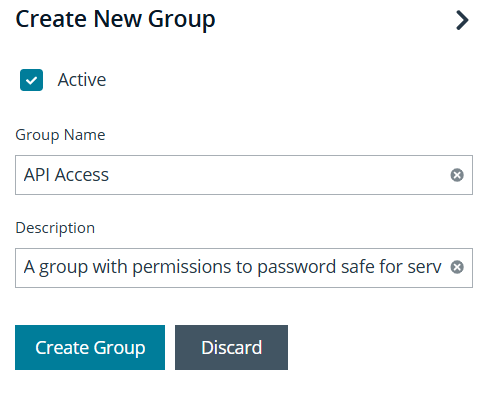
<li class="">Click the <strong>Groups</strong> tab and select <strong>Create New Group</strong> &gt; <strong>Create a New Group</strong>.</li>
<li class="">Enter <code>API Access</code> as the <strong>Group Name</strong>, provide a <strong>Description</strong>, and click <strong>Create Group</strong>.<p></p><div aria-owns="rmiz-modal-" data-rmiz=""><div data-rmiz-content="not-found" style="visibility:visible"><img src="https://pradeepkg.github.io/RSA/assets/images/app-2-55d2588421971584107a1c1b3b4d6ddc.png" style="max-width:400px;max-height:400px;width:auto;height:auto;cursor:zoom-in;margin:0;display:block"></div></div><p></p></li>
</ol>
</li>
<li class="">
<p><strong>Create a Smart Group:</strong></p>
<ol>
<li class="">Navigate to <strong>Managed Accounts</strong>.</li>
<li class="">Select the accounts RSA G&amp;L will access.</li>
<li class="">Click <strong>Add to Smart Group</strong>.</li>
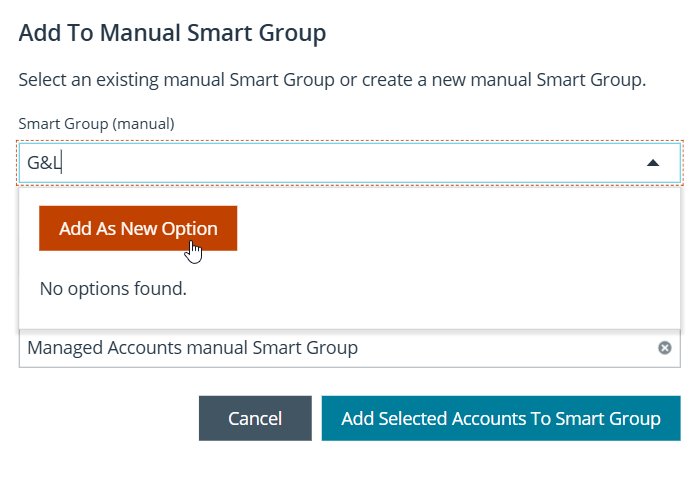
<li class="">In the <strong>Add To Manual Smart Group</strong> dialog, enter <code>G&amp;L</code> in the <strong>Smart Group (manual)</strong> field.</li>
<li class="">Click <strong>Add As New Option</strong>.<p></p><div aria-owns="rmiz-modal-" data-rmiz=""><div data-rmiz-content="not-found" style="visibility:visible"><img src="https://pradeepkg.github.io/RSA/assets/images/app-4-dd06b5a76c1d2f46b1a377076d6d4799.png" style="max-width:400px;max-height:400px;width:auto;height:auto;cursor:zoom-in;margin:0;display:block"></div></div><p></p></li>
<li class="">Set <strong>Category</strong> to <strong>Managed Accounts</strong>, provide an optional <strong>Description</strong>, and click <strong>Add Selected Accounts To Smart Group</strong>.</li>
</ol>
</li>
</ol>
<h3 class="anchor anchorTargetStickyNavbar_Vzrq" id="step-2-configure-api-access-and-permissions">Step 2: Configure API Access and Permissions<a href="https://pradeepkg.github.io/RSA/pam/beyondtrust/#step-2-configure-api-access-and-permissions" class="hash-link" aria-label="Direct link to Step 2: Configure API Access and Permissions" title="Direct link to Step 2: Configure API Access and Permissions" translate="no">​</a></h3>
<p>Next, configure API access policies and assign permissions to the user group.</p>
<ol>
<li class="">
<p><strong>Configure API Access Policy:</strong></p>
<ol>
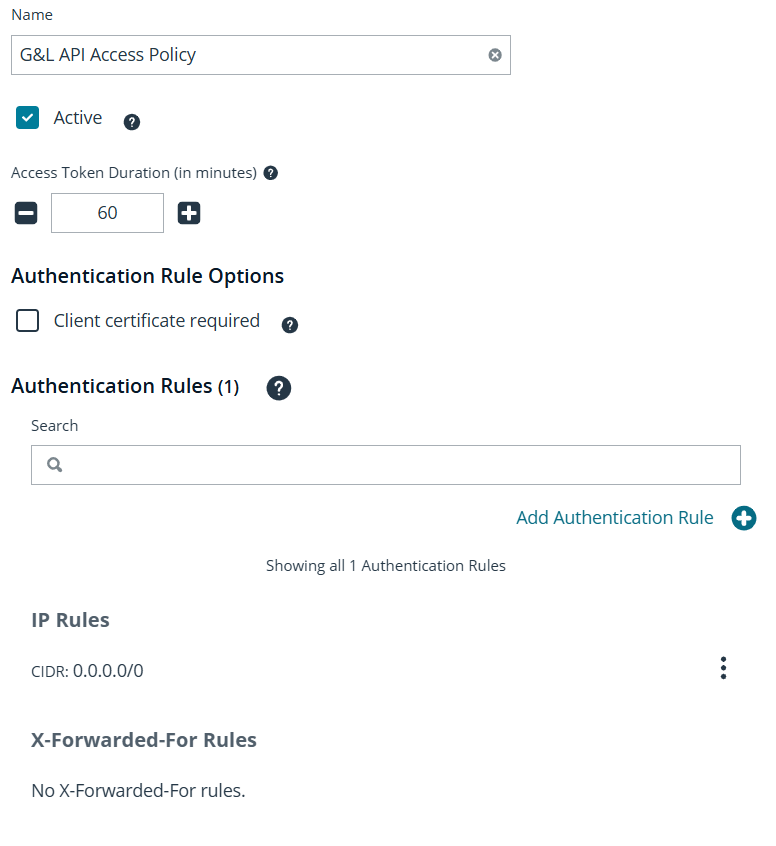
<li class="">Go to <strong>Configuration</strong> &gt; <strong>General</strong> &gt; <strong>API Registrations</strong>.</li>
<li class="">Click <strong>Create API Registration</strong> and select <strong>API Access Policy</strong>.</li>
<li class="">Fill in the registration details, including the <strong>Access Token Duration</strong>.<p></p><div aria-owns="rmiz-modal-" data-rmiz=""><div data-rmiz-content="not-found" style="visibility:visible"><img src="https://pradeepkg.github.io/RSA/assets/images/app-1-2030555fe9df8fa11b12db6a9931f16a.png" style="max-width:400px;max-height:400px;width:auto;height:auto;cursor:zoom-in;margin:0;display:block"></div></div><p></p></li>
<li class="">Click <strong>Add Authentication Rule</strong>, select <strong>CIDR</strong> and <strong>IP Rule</strong>, and add the appropriate CIDR (e.g., <code>0.0.0.0/0</code> for initial testing).</li>
<li class="">Click <strong>Create Rule</strong>.</li>
</ol>
</li>
<li class="">
<p><strong>Assign Permissions and Features:</strong></p>
<ol>
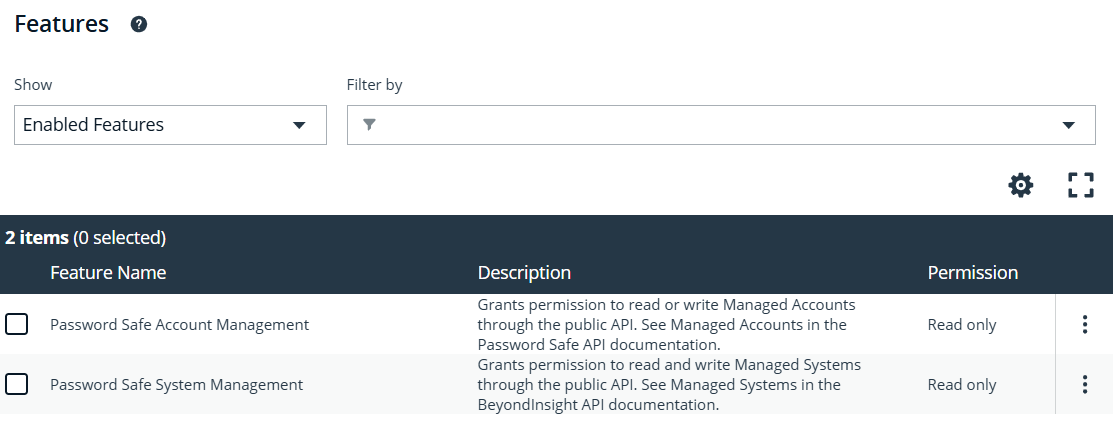
<li class="">Go to the <code>API Access</code> group details and select the <strong>Features</strong> tab.</li>
<li class="">Select <strong>All Features</strong>, search for and select <strong>Password Safe Account Management</strong> and <strong>Password Safe System Management</strong>.</li>
<li class="">Click <strong>Assign Permissions</strong> and grant <strong>Read Only</strong> access.<p></p><div aria-owns="rmiz-modal-" data-rmiz=""><div data-rmiz-content="not-found" style="visibility:visible"><img src="https://pradeepkg.github.io/RSA/assets/images/app-3-60be0e8c0773991a3b66a7c36d43cf4f.png" style="max-width:400px;max-height:400px;width:auto;height:auto;cursor:zoom-in;margin:0;display:block"></div></div><p></p></li>
</ol>
</li>
</ol>
<h3 class="anchor anchorTargetStickyNavbar_Vzrq" id="step-3-create-an-access-policy">Step 3: Create an Access Policy<a href="https://pradeepkg.github.io/RSA/pam/beyondtrust/#step-3-create-an-access-policy" class="hash-link" aria-label="Direct link to Step 3: Create an Access Policy" title="Direct link to Step 3: Create an Access Policy" translate="no">​</a></h3>
<p>Create an access policy to govern how credentials are released.</p>
<ol>
<li class="">Go to <strong>Configuration</strong> &gt; <strong>Privileged Access Management Policies</strong> &gt; <strong>Access Policies</strong>.</li>
<li class="">Click <strong>Create Policy</strong>.</li>
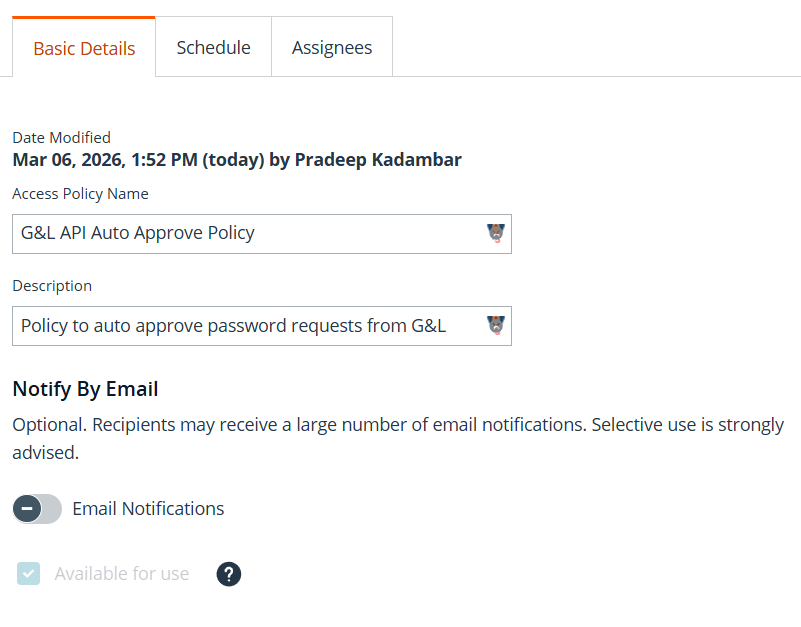
<li class="">Enter <code>G&amp;L API Auto Approve Policy</code> for the <strong>Access Policy Name</strong> and provide a <strong>Description</strong>.<p></p><div aria-owns="rmiz-modal-" data-rmiz=""><div data-rmiz-content="not-found" style="visibility:visible"><img src="https://pradeepkg.github.io/RSA/assets/images/app-8-895d1c3d00d3a313904af15c3d9f0c6d.png" style="max-width:400px;max-height:400px;width:auto;height:auto;cursor:zoom-in;margin:0;display:block"></div></div><p></p></li>
<li class="">Click <strong>Create Policy</strong>.</li>
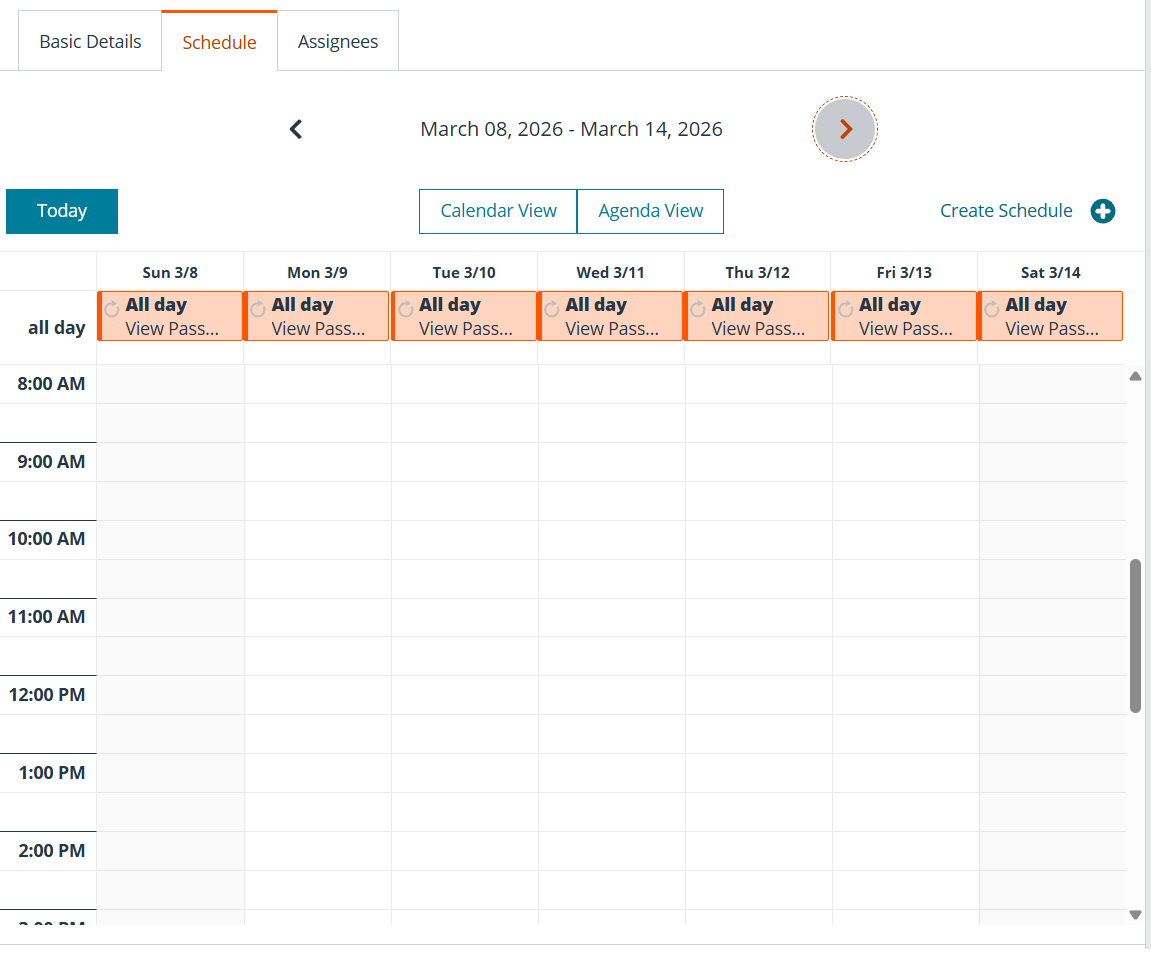
<li class="">On the <strong>Schedule</strong> tab, click <strong>Create Schedule</strong>.<p></p><div aria-owns="rmiz-modal-" data-rmiz=""><div data-rmiz-content="not-found" style="visibility:visible"><img src="https://pradeepkg.github.io/RSA/assets/images/app-9-a5a55a81dc5f80caf8496a3a2910fc22.png" style="max-width:400px;max-height:400px;width:auto;height:auto;cursor:zoom-in;margin:0;display:block"></div></div><p></p></li>
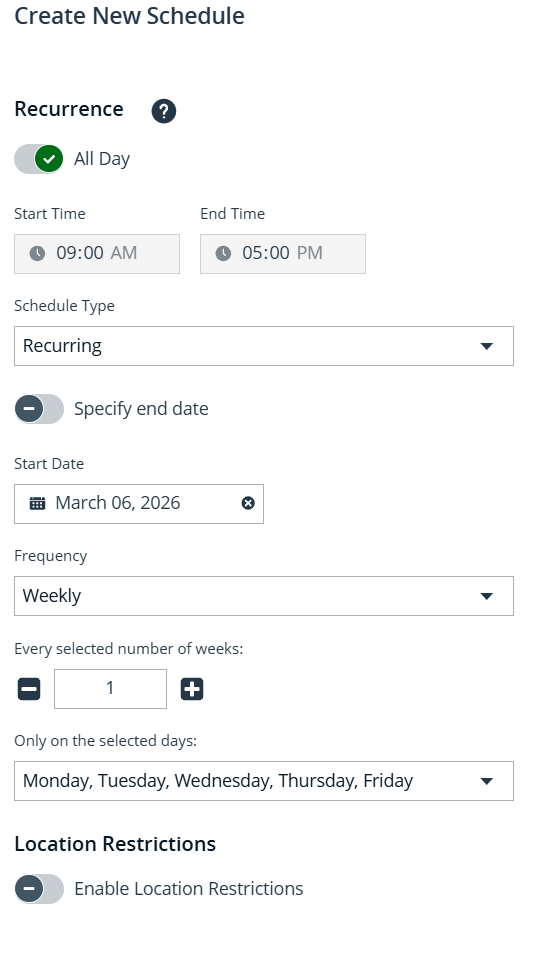
<li class="">Enable <strong>All Day</strong> and verify the <strong>Recurrence</strong> settings.<p></p><div aria-owns="rmiz-modal-" data-rmiz=""><div data-rmiz-content="not-found" style="visibility:visible"><img src="https://pradeepkg.github.io/RSA/assets/images/app-6-12457e4090c33ffb2da715e164a6dab2.png" style="max-width:400px;max-height:400px;width:auto;height:auto;cursor:zoom-in;margin:0;display:block"></div></div><p></p></li>
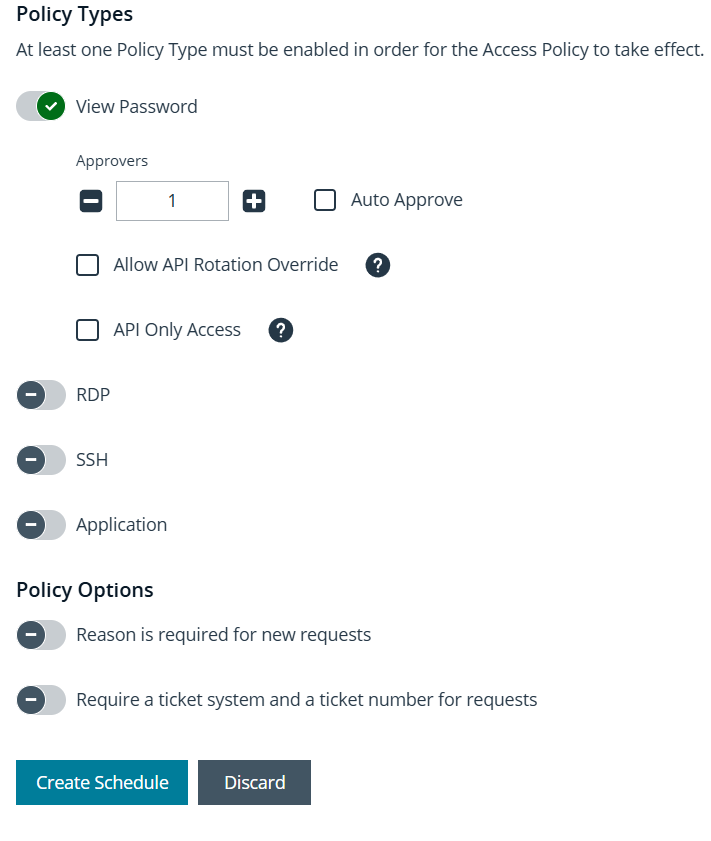
<li class="">Under <strong>Policy Types</strong>, select <strong>View Password</strong>, <strong>Auto Approve</strong>, and <strong>API Only Access</strong>.<p></p><div aria-owns="rmiz-modal-" data-rmiz=""><div data-rmiz-content="not-found" style="visibility:visible"><img src="https://pradeepkg.github.io/RSA/assets/images/app-7-71aa6a92c3b1872e1dfef6115988f9ae.png" style="max-width:400px;max-height:400px;width:auto;height:auto;cursor:zoom-in;margin:0;display:block"></div></div><p></p></li>
<li class="">Click <strong>Create Schedule</strong>.</li>
</ol>
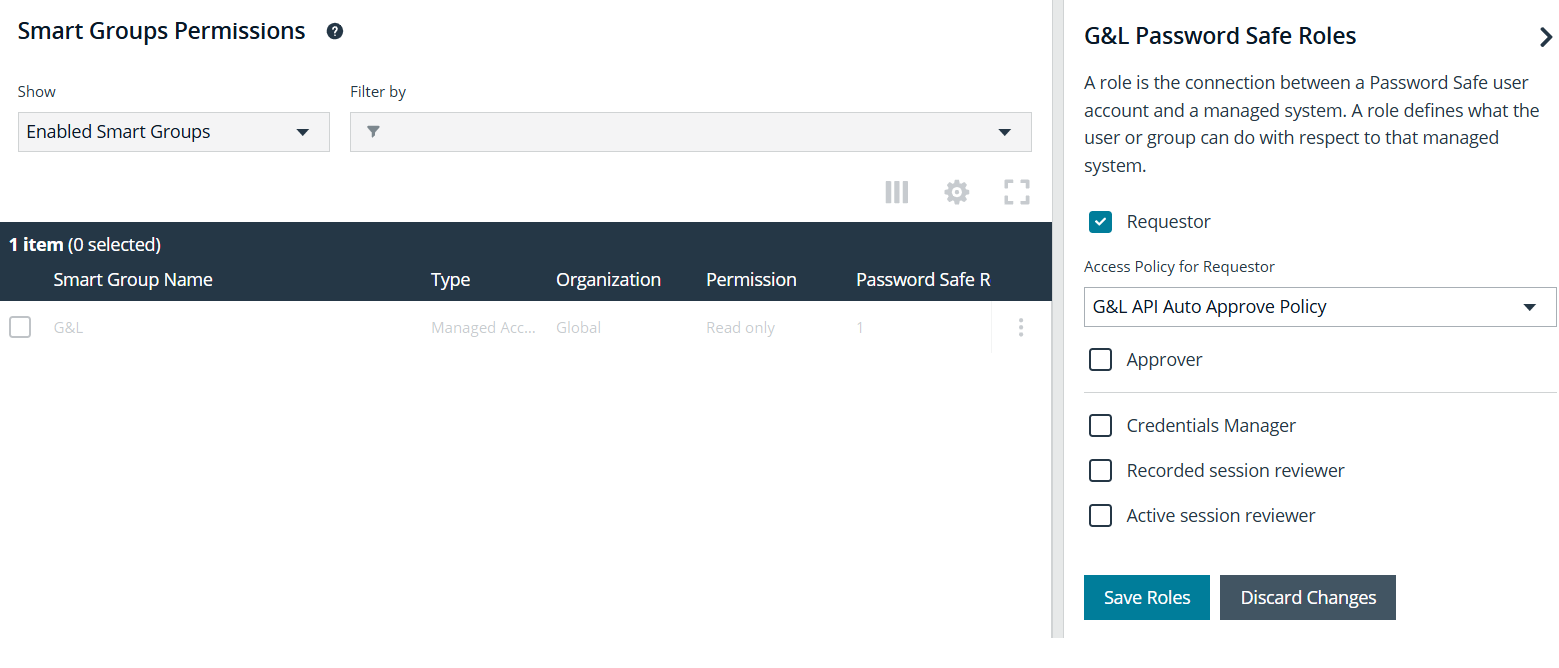
<h3 class="anchor anchorTargetStickyNavbar_Vzrq" id="step-4-assign-smart-group-roles">Step 4: Assign Smart Group Roles<a href="https://pradeepkg.github.io/RSA/pam/beyondtrust/#step-4-assign-smart-group-roles" class="hash-link" aria-label="Direct link to Step 4: Assign Smart Group Roles" title="Direct link to Step 4: Assign Smart Group Roles" translate="no">​</a></h3>
<p>Assign the <code>Requestor</code> role to the smart group and associate it with the access policy.</p>
<ol>
<li class="">Go to <strong>User Management</strong> &gt; <strong>Groups</strong> &gt; <code>API Access</code>.</li>
<li class="">Click the <strong>Smart Groups</strong> tab, find the <code>G&amp;L</code> smart group, and select <strong>Edit Password Safe Roles</strong>.</li>
<li class="">Check the <strong>Requestor</strong> role.</li>
<li class="">For <strong>Access Policy</strong>, select <code>G&amp;L API Auto Approve Policy</code>.<p></p><div aria-owns="rmiz-modal-" data-rmiz=""><div data-rmiz-content="not-found" style="visibility:visible"><img src="https://pradeepkg.github.io/RSA/assets/images/app-10-22b164b313dd2f905a4a5734713c03fa.png" style="max-width:400px;max-height:400px;width:auto;height:auto;cursor:zoom-in;margin:0;display:block"></div></div><p></p></li>
<li class="">Click <strong>Save Roles</strong>.</li>
</ol>
<h3 class="anchor anchorTargetStickyNavbar_Vzrq" id="step-5-create-and-configure-an-api-user">Step 5: Create and Configure an API User<a href="https://pradeepkg.github.io/RSA/pam/beyondtrust/#step-5-create-and-configure-an-api-user" class="hash-link" aria-label="Direct link to Step 5: Create and Configure an API User" title="Direct link to Step 5: Create and Configure an API User" translate="no">​</a></h3>
<p>Finally, create an API user and assign it to the user group.</p>
<ol>
<li class="">Go to <strong>Configuration</strong> &gt; <strong>Role Based Access</strong> &gt; <strong>User Management</strong>.</li>
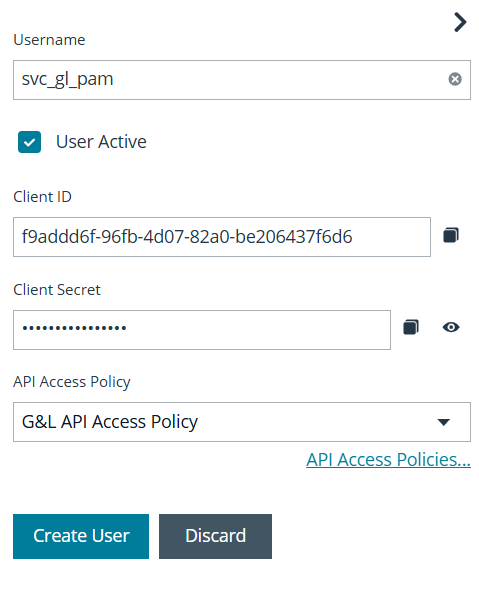
<li class="">Click the <strong>Users</strong> tab and select <strong>Add an Application User</strong>.</li>
<li class="">Enter <code>svc_gl_pam</code> for the <strong>Username</strong>.</li>
<li class="">Under <strong>API Access Policy</strong>, select the policy you created.</li>
<li class=""><strong>Important:</strong> Copy the <strong>Client ID</strong> and <strong>Client Secret</strong> for later use.<p></p><div aria-owns="rmiz-modal-" data-rmiz=""><div data-rmiz-content="not-found" style="visibility:visible"><img src="https://pradeepkg.github.io/RSA/assets/images/app-11-06055026b67baaad03fcfc6f8877ef86.png" style="max-width:400px;max-height:400px;width:auto;height:auto;cursor:zoom-in;margin:0;display:block"></div></div><p></p></li>
<li class="">Click <strong>Create User</strong>.</li>
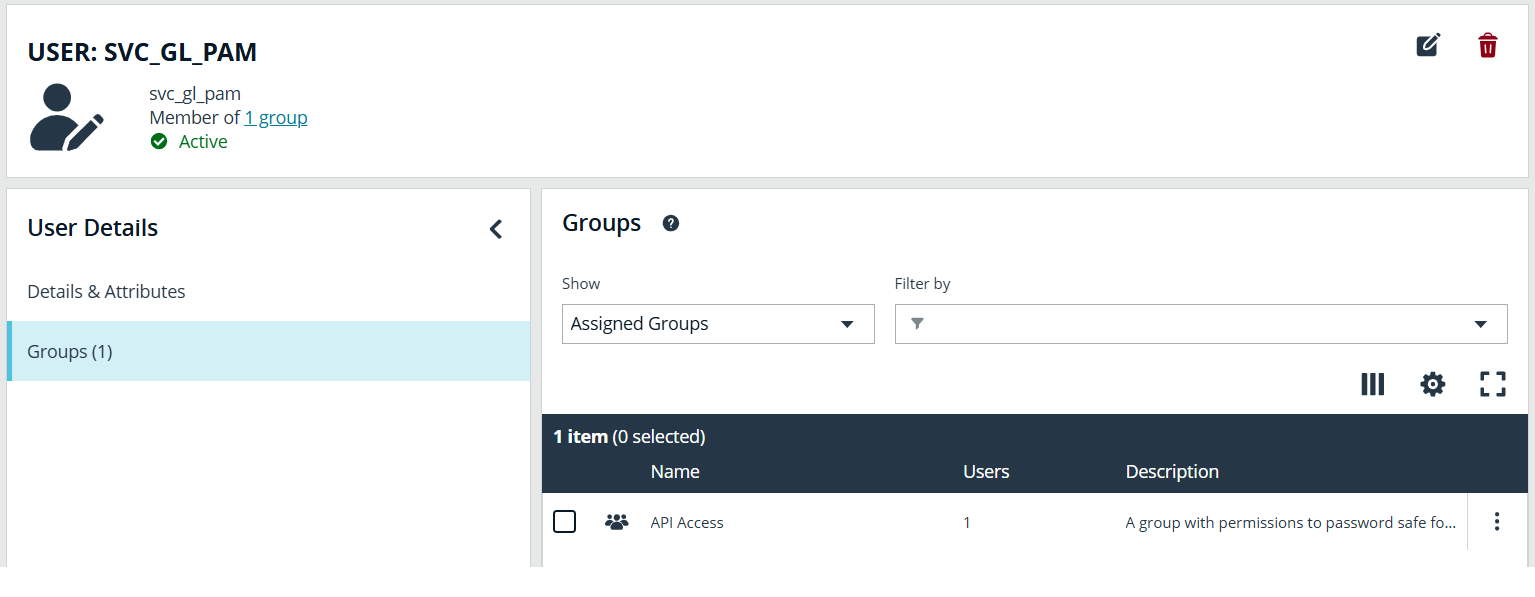
<li class="">Assign the user to the <code>API Access</code> group.<p></p><div aria-owns="rmiz-modal-" data-rmiz=""><div data-rmiz-content="not-found" style="visibility:visible"><img src="https://pradeepkg.github.io/RSA/assets/images/app-12-2a9967bc1770574da47845703f4e2154.png" style="max-width:400px;max-height:400px;width:auto;height:auto;cursor:zoom-in;margin:0;display:block"></div></div><p></p></li>
</ol>
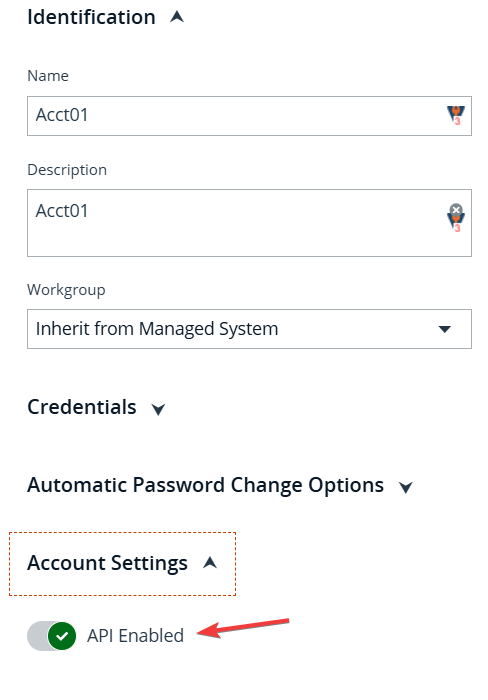
<h3 class="anchor anchorTargetStickyNavbar_Vzrq" id="step-6-enable-api-access-on-managed-accounts">Step 6: Enable API Access on Managed Accounts<a href="https://pradeepkg.github.io/RSA/pam/beyondtrust/#step-6-enable-api-access-on-managed-accounts" class="hash-link" aria-label="Direct link to Step 6: Enable API Access on Managed Accounts" title="Direct link to Step 6: Enable API Access on Managed Accounts" translate="no">​</a></h3>
<p>Ensure that API access is enabled for the managed accounts you want to access.</p>
<ol>
<li class="">Go to <strong>Managed Accounts</strong>.</li>
<li class="">For each account, ensure <strong>Enable API Access</strong> is toggled to <strong>Yes</strong> in the <strong>Account Settings</strong>.<p></p><div aria-owns="rmiz-modal-" data-rmiz=""><div data-rmiz-content="not-found" style="visibility:visible"><img src="https://pradeepkg.github.io/RSA/assets/images/app-13-4c3e1bba12977bb89ed855ac39d3a8e2.png" style="max-width:400px;max-height:400px;width:auto;height:auto;cursor:zoom-in;margin:0;display:block"></div></div><p></p></li>
</ol>
<h2 class="anchor anchorTargetStickyNavbar_Vzrq" id="troubleshooting">Troubleshooting<a href="https://pradeepkg.github.io/RSA/pam/beyondtrust/#troubleshooting" class="hash-link" aria-label="Direct link to Troubleshooting" title="Direct link to Troubleshooting" translate="no">​</a></h2>
<p>Here are some common issues and their solutions:</p>
<ul>
<li class=""><strong>API authentication errors:</strong>
<ul>
<li class="">Verify that the Client ID and Client Secret are correct.</li>
<li class="">Ensure the API user is assigned to the correct user group.</li>
<li class="">Check that the API access policy is correctly configured with the right IP address or CIDR range.</li>
</ul>
</li>
<li class=""><strong>Unable to retrieve passwords:</strong>
<ul>
<li class="">Confirm that the <code>Requestor</code> role is assigned to the smart group.</li>
<li class="">Verify that the access policy is correctly configured to auto-approve requests.</li>
<li class="">Ensure that API access is enabled on the managed accounts.</li>
</ul>
</li>
<li class=""><strong>Access denied errors:</strong>
<ul>
<li class="">Check that the user group has the necessary <code>Read Only</code> permissions for <strong>Password Safe Account Management</strong> and <strong>Password Safe System Management</strong>.</li>
</ul>
</li>
</ul>
<hr>
<h2 class="anchor anchorTargetStickyNavbar_Vzrq" id="references"><strong>References</strong><a href="https://pradeepkg.github.io/RSA/pam/beyondtrust/#references" class="hash-link" aria-label="Direct link to references" title="Direct link to references" translate="no">​</a></h2>
<ul>
<li class=""><a href="https://docs.databee.buzz/docs/beyondtrust-password-safe" target="_blank" rel="noopener noreferrer" class="">BeyondTrust Password Safe - DataBee Documentation</a></li>
</ul>]]></content>
        <author>
            <name>Pradeep Kadambar</name>
            <uri>https://www.linkedin.com/in/pradeepkg/</uri>
        </author>
        <category label="BeyondTrust" term="BeyondTrust"/>
        <category label="PAM" term="PAM"/>
    </entry>
</feed>