Provisioning Command Response Handling

A Provisioning Command activity in an RSA Identity Governance & Lifecycle (G&L) workflow sends an account change to a target connector. By default, the activity's own success/failure transition only confirms that the node executed. It does not confirm whether the target system actually applied the change. To get the real outcome, enable Wait for Result and read the status job properties it populates.
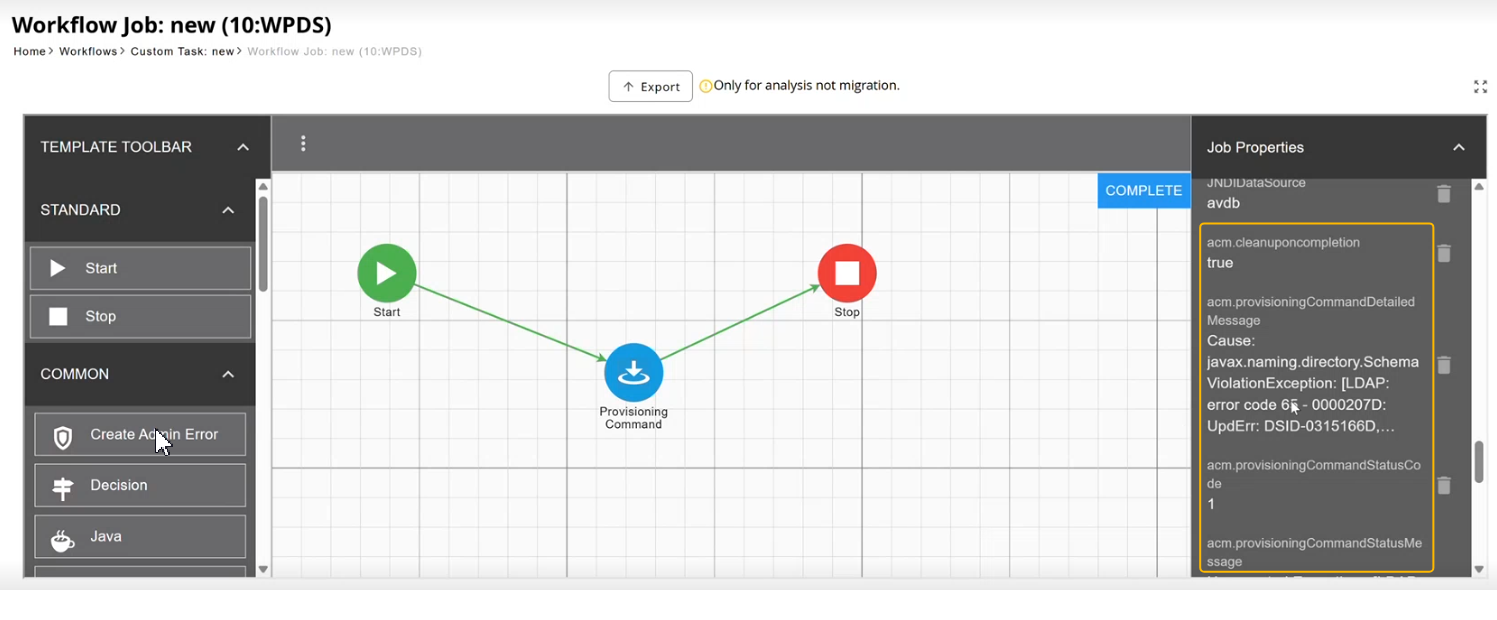
Node execution status vs. provisioning outcome
The Provisioning Command node itself completes with a status of 0 if it executed and -1 if it did not. RSA's documentation is explicit that this status "only confirms if the Provisioning Command executed, and does not actually represent the status of the Provisioning event." A node can report successful execution even when the target connector rejected the change.
To check the actual provisioning result, enable Wait for Result on the Provisioning Command node.
Job properties
With Wait for Result enabled, G&L sets the following job properties once the command returns. These are visible on the Job Properties panel of a Workflow Job for troubleshooting, and can also be read into the workflow itself (see below).
| Property | Description |
|---|---|
acm.provisioningCommandStatusCode | Numeric outcome of the command. RSA Knowledge Base article 000065579 (versions 6.9.1–7.1.1) documents 0 for success and -1 for failure. On later releases this convention may differ. A failed command was observed with a value of 1 on one G&L 10.x instance, so confirm the actual values against your own environment rather than assuming -1. |
acm.provisioningCommandStatusMessage | Short text summary of the outcome; Success when the command succeeds. |
acm.provisioningCommandDetailedMessage | Full error detail returned by the target connector when the command fails, for example the underlying exception and error code from the target directory or database. |
acm.cleanuponcompletion | Boolean flag controlling whether G&L removes the provisioning command record once the job completes. |
acm.provisioningCommandDetailedMessage and acm.cleanuponcompletion are available in RSA Identity Governance & Lifecycle 8.0.0 P12 or later.
These values are overwritten by the next Provisioning Command node in the workflow, so read them immediately after the node they belong to before running another provisioning command.
Example: a failed command
The following acm.provisioningCommandDetailedMessage value was observed for a failed command targeting an LDAP directory:
Cause: javax.naming.directory.SchemaViolationException:
  [LDAP: error code 65 - 0000207D: UpdErr: DSID-0315166D, ...]
error code 65 and the DSID-... identifier are standard Microsoft Active Directory LDAP diagnostic codes, not environment-specific values. The message points to a schema violation on the target directory, which is what you'd hand to an administrator or log for troubleshooting.
Reading the variables
Add a SQL Select node after the Provisioning Command node to pull the values into workflow variables:
SELECT ${jobUserData_acm.provisioningCommandStatusCode} AS errorcode,
${jobUserData_acm.provisioningCommandStatusMessage} AS errormsg
FROM DUAL
Branching on the result
Add a Decision node after the SQL Select node and evaluate the returned errorcode:
0: proceed along the success path.-1: route to error handling, for example a Create Admin Error activity usingerrormsgfor the failure detail.
Notes
- The Wait for Result option requires RSA Identity Governance & Lifecycle 6.9.1 P06 or later. Confirm behavior against the release notes for your specific version before relying on it.
- Without Wait for Result enabled, the status variables are not populated and only the node's own execution status is available.
References
- Provisioning node CommandStatusCode and CommandStatusMessage in RSA Identity Governance & Lifecycle (RSA Knowledge Base article 000065579)