IBM iSeries (AS400)

 The IBM AS400 is another name for the IBM Power Systems server line, started in the late 1980s. Technically, AS400 is the name of the first generation, and the computer is now called the IBM iSeries. The IBM AS400 is designed to provide extremely high redundancy and uptime. It is traditionally run on-premise, using one of three mature operating systems, optimized for the architecture: OS/400 and AIX. The IBM AS400 is another name for the IBM Power Systems server line, started in the late 1980s. Technically, AS400 is the name of the first generation, and the computer is now called the IBM iSeries. The IBM AS400 is designed to provide extremely high redundancy and uptime. It is traditionally run on-premise, using one of three mature operating systems, optimized for the architecture: OS/400 and AIX.Versions: 8.0.0 P8Identities ❌ | Accounts ✔️ | Groups ✔️ | App Roles ❌ | Entitlements ✔️ |
Overview
QSYS2 is the system-wide catalog schema on IBM i. It contains metadata views and tables for the entire relational database, covering all schemas, users, tables, authorities, and system objects in one place. QSYS2 is the IBM i equivalent of INFORMATION_SCHEMA or system catalogs on other databases; it provides centralized, cross-schema views for identity and access management.
USER_INFOin QSYS2 lists all user profiles on the entire IBM i system, regardless of which application schemas they own or access.SYSTABLESin QSYS2 lists all tables across every schema/library on the system.AUTHORIZATION_LIST_USER_INFOin QSYS2 lists all authorization lists and memberships system-wide.GROUP_PROFILE_ENTRIESin QSYS2 lists all group memberships for every user on the system.
You do not need to connect to individual application schemas (like MYAPP, FINANCE, HR) separately. QSYS2 aggregates metadata from the entire system into a single queryable location.
For this article, we are goign to use the JTOpen (an open source version of the IBM Toolbox for Java) JDBC driver.
Application
Steps
- Login to RSA G&L console as System Administrator.
- Navigate to Resources > Application.
- Click on Create Application and select Other Application.
- Enter the details as shown below.

- Click Finish.
Account Collector
This section explains the process for configuring an account collector for the IBM iSeries (AS400) application. We will use the database collector for this purpose.
Steps
- Login to RSA G&L console as System Administrator.
- Navigate to Resources > Applications.
- Click on IBM iSeries (AS400).
- Navigate to Collectors tab and click on Create Account Collector. Enter the details as shown below.
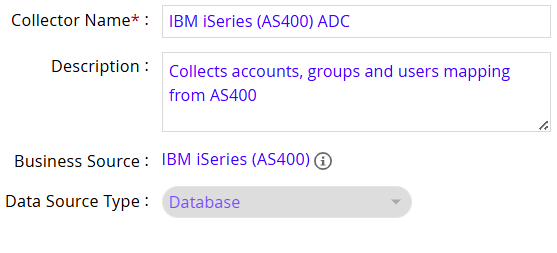
| Driver | com.ibm.as400.access.AS400JDBCDriver |
| URL | jdbc:as400://hostname.com:8471 |
- Click Next and enter the database details. Use the Test Connection to make sure the connection details are accurate.
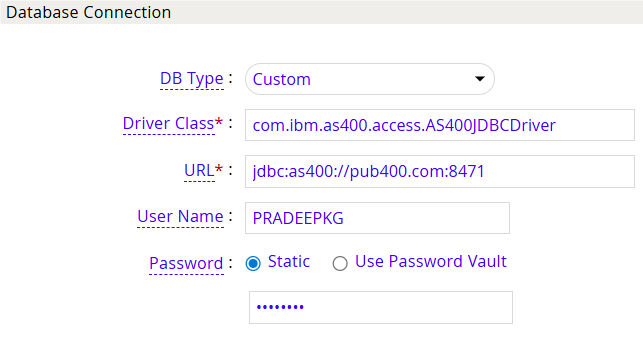
- Click Next. Select the appropriate data that you intend to collect.

- Click Next. On the Account Data page, enter the following query to collect account information.
SELECT
  u.AUTHORIZATION_NAME      AS user_name,
  CASE WHEN u.STATUS = '*ENABLED' THEN 0 ELSE 1 END AS is_disabled,
  u.PREVIOUS_SIGNON         AS last_signon_timestamp,
  u.DATE_PASSWORD_EXPIRES   AS password_expires_timestamp,
  u.TEXT_DESCRIPTION        AS description
FROM QSYS2.USER_INFO_BASIC u
WHERE u.AUTHORIZATION_NAME NOT LIKE 'Q%'       -- Exclude IBM out-of-the-box system profiles
  AND u.AUTHORIZATION_NAME NOT IN (
        SELECT DISTINCT GROUP_PROFILE_NAME
        FROM QSYS2.GROUP_PROFILE_ENTRIES
      )                                        -- Exclude group-only accounts
ORDER BY u.AUTHORIZATION_NAME
The following are the important attributes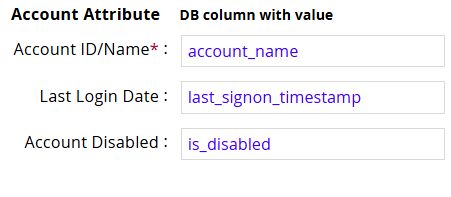
8. Click Next. On the User Account Mappings Data configuration page enter the following query to map the IBM iSeries (AS400) account to user identity.
SELECT
  u.AUTHORIZATION_NAME      AS account_name,
    u.AUTHORIZATION_NAME      AS user_name
FROM QSYS2.USER_INFO_BASIC u
WHERE u.AUTHORIZATION_NAME NOT LIKE 'Q%'       -- Exclude IBM out-of-the-box system profiles
  AND u.AUTHORIZATION_NAME NOT IN (
        SELECT DISTINCT GROUP_PROFILE_NAME
        FROM QSYS2.GROUP_PROFILE_ENTRIES
      )                                        -- Exclude group-only accounts
ORDER BY u.AUTHORIZATION_NAME
The following are the important attributes
9. Click Next. In the Group Data configuration section enter the following query to collect groups from IBM iSeries (AS400).
SELECT
  u.AUTHORIZATION_NAME      AS group_name,
  u.TEXT_DESCRIPTION        AS description,
  u.STATUS                  AS group_status,        -- *ENABLED / *DISABLED
  u.USER_OWNER              AS profile_owner,       -- owner of the *USRPRF object
  u.USER_CREATOR            AS profile_creator,     -- creator of the *USRPRF object
  u.SPECIAL_AUTHORITIES     AS special_authorities, -- e.g., *ALLOBJ, *SECADM
  u.GROUP_ID_NUMBER         AS gid,
  u.CREATION_TIMESTAMP      AS created_at,
  u.LAST_USED_TIMESTAMP     AS last_used
FROM QSYS2.USER_INFO u
WHERE u.GROUP_MEMBER_INDICATOR = 'YES'             -- profiles that function as group profiles
  AND u.AUTHORIZATION_NAME NOT LIKE 'Q%'           -- optional: drop IBM-supplied groups
ORDER BY u.AUTHORIZATION_NAME
The following are the important attributes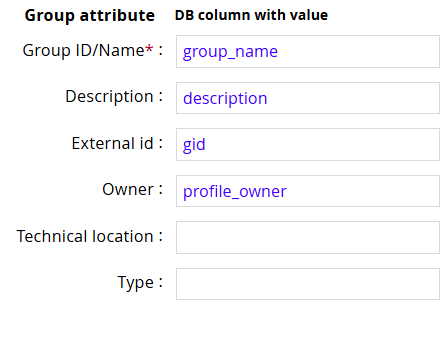
- In the Account Membership Data configuration section enter the following query to collect groups membership information from IBM iSeries (AS400).
SELECT
  e.GROUP_PROFILE_NAME AS group_name,
  e.USER_PROFILE_NAME  AS account_name,
  CASE
    WHEN u.GROUP_PROFILE_NAME = e.GROUP_PROFILE_NAME THEN 'PRIMARY'
    ELSE 'SUPPLEMENTAL'
  END AS membership_type
FROM QSYS2.GROUP_PROFILE_ENTRIES e
LEFT JOIN QSYS2.USER_INFO u
  ON u.AUTHORIZATION_NAME = e.USER_PROFILE_NAME
ORDER BY group_name, user_name
- Click Next. In the User Resolution Rules, map the user to account

- Click Next. In the Member Account Resolution Rules, map the account collector.

- Click Finish. Use the Test function to make sure the configurations are accurate.
Entitlement Collector (DRAFT)
This section explains the process for configuring an entitlement collector to collect authorization lists from IBM iSeries (AS400) application. We will use the database collector for this purpose.
Steps
- Login to RSA G&L console as AveksaAdmin.
- Navigate to Resources > Applications.
- Click on IBM iSeries (AS400).
- Navigate to Collectors tab and click on Create Entitlement Collector. Enter the details as shown below.
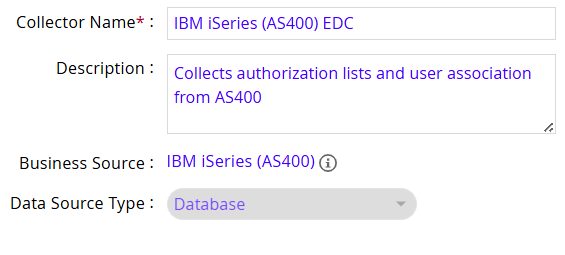
- Click Next and enter the database connection details as shown in Step 5 of Account Collector.
- Click Next. Select the data types that the collector will be collecting from IBM iSeries (AS400).
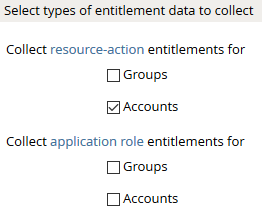
- Click Next. On the General Column Names, map the attribute names.
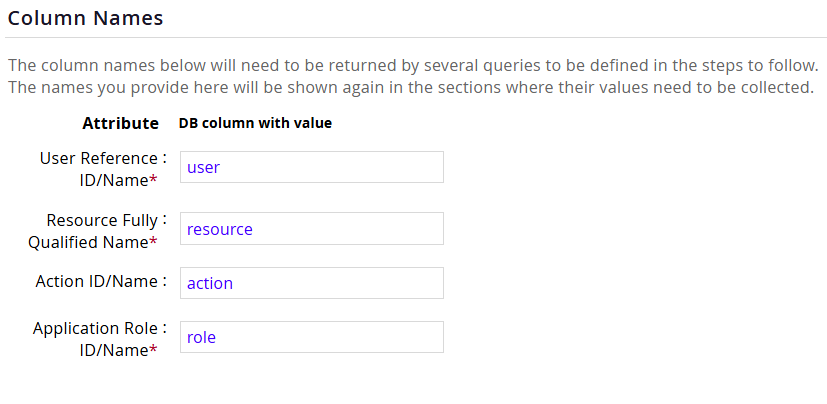
- Click Next. Under Application Role Data section, use the following query to authorization lists from IBM iSeries (AS400).
SELECT
  AUTHORIZATION_LIST       AS role,
  TEXT_DESCRIPTION         AS description,
  OWNER                    AS owner
FROM QSYS2.AUTHORIZATION_LIST_INFO
WHERE AUTHORIZATION_LIST NOT LIKE 'Q%'
ORDER BY AUTHORIZATION_LIST
The following are the important attributes
9. Click Next. On the Resource-Action Entitlements Data section, enter the query below to collect resource action mappings for roles.
SELECT
DISTINCT trim(UPUSCL) as resource, '*ALLOBJ' as action
FROM
QGPL.DSPUSRPRF
WHERE
UPSPAU LIKE '%*ALLOBJ%'
UNION
SELECT
DISTINCT trim(UPUSCL) as resource, '*AUDIT' as action
FROM
QGPL.DSPUSRPRF
WHERE
UPSPAU LIKE '%*AUDIT%'
UNION
SELECT
DISTINCT trim(UPUSCL) as resource, '*IOSYSCFG' as action
FROM
QGPL.DSPUSRPRF
WHERE
UPSPAU LIKE '%*IOSYSCFG%'
UNION
SELECT
DISTINCT trim(UPUSCL) as resource, '* JOBCTL' as action
FROM
QGPL.DSPUSRPRF
WHERE
UPSPAU LIKE '%*JOBCTL%'
UNION
SELECT
DISTINCT trim(UPUSCL) as resource, '* SAVSYS' as action
FROM
QGPL.DSPUSRPRF
WHERE
UPSPAU LIKE '%*SAVSYS%'
UNION
SELECT
DISTINCT trim(UPUSCL) as resource, '*SECADM' as action
FROM
QGPL.DSPUSRPRF
WHERE
UPSPAU LIKE '%* SECADM%'
UNION
SELECT
DISTINCT trim(UPUSCL) as resource, '*SERVICE' as action
FROM
QGPL.DSPUSRPRF
WHERE
UPSPAU LIKE '%*SERVICE%'
UNION
SELECT
DISTINCT trim(UPUSCL) as resource, '*SPLCTL' as action
FROM
QGPL.DSPUSRPRF
WHERE
UPSPAU LIKE '%*SPLCTL%'
UNION
SELECT
DISTINCT trim(UPUSCL) as resource, '*NONE' as action
FROM
QGPL.DSPUSRPRF
WHERE
UPSPAU LIKE '%*NONE%'
- Click Next. On the Account Data section, enter the query below to collect mappings for account to roles.
SELECT
DISTINCT trim(UPUSCL) as resource, '*ALLOBJ' as action, trim(UPUPRF) as LID
FROM
QGPL.DSPUSRPRF
WHERE
UPSPAU LIKE '%*ALLOBJ%'
UNION
SELECT
DISTINCT trim(UPUSCL) as resource, '*AUDIT' as action, trim(UPUPRF) as LID
FROM
QGPL.DSPUSRPRF
WHERE
UPSPAU LIKE '%*AUDIT%'
UNION
SELECT
DISTINCT trim(UPUSCL) as resource, '*IOSYSCFG' as action, trim(UPUPRF) as LID
FROM
QGPL.DSPUSRPRF
WHERE
UPSPAU LIKE '%*IOSYSCFG%'
UNION
SELECT
DISTINCT trim(UPUSCL) as resource, '* JOBCTL' as action, trim(UPUPRF) as LID
FROM
QGPL.DSPUSRPRF
WHERE
UPSPAU LIKE '%*JOBCTL%'
UNION
SELECT
DISTINCT trim(UPUSCL) as resource, '* SAVSYS' as action, trim(UPUPRF) as LID
FROM
QGPL.DSPUSRPRF
WHERE
UPSPAU LIKE '%*SAVSYS%'
UNION
SELECT
DISTINCT trim(UPUSCL) as resource, '*SECADM' as action, trim(UPUPRF) as LID
FROM
QGPL.DSPUSRPRF
WHERE
UPSPAU LIKE '%* SECADM%'
UNION
SELECT
DISTINCT trim(UPUSCL) as resource, '*SERVICE' as action, trim(UPUPRF) as LID
FROM
QGPL.DSPUSRPRF
WHERE
UPSPAU LIKE '%*SERVICE%'
UNION
SELECT
DISTINCT trim(UPUSCL) as resource, '*SPLCTL' as action, trim(UPUPRF) as LID
FROM
QGPL.DSPUSRPRF
WHERE
UPSPAU LIKE '%*SPLCTL%'
UNION
SELECT
DISTINCT trim(UPUSCL) as resource, '*NONE' as action, trim(UPUPRF) as LID
FROM
QGPL.DSPUSRPRF
WHERE
UPSPAU LIKE '%*NONE%'
- Click Next. In the User Evaluation, map the account to the ADC.
| Associated account collector | Account value evaluates to |
|---|---|
| IBM iSeries (AS400) ADC | Account Name |
- Click Next and then click Finish. Use the Test function to make sure the configurations are accurate.
Setup
AS400
User profile information available on the AS400 is not automatically maintained in an accessible table format. The table needs to be created and refreshed by running a simple command on the AS400. Typically, the command is scheduled to be run daily, before collection is initiated from the RSA G&L.
A JDBC based AS400 specific collector can collect and parse the user account data for both account and entitlement information. A user account with read access is required to the AS400.
The high-level steps are as follows:
- Generate the user table by executing the following command.
**DSPUSRPRF USRPRF(*ALL) TYPE(BASIC) OUTPUT(OUTFILE) OUTFILE(QGPL/DSPUSRPRF)
- Set up a batch job to run the above command daily, before scheduled collections run on RSA G&L.
- Create a user account that has read access to the table: QGPL/DSPUSRPRF.
RSA G&L
This integration uses the AS400 JDBC Driver (com.ibm.as400.access.AS400JDBCDriver) to connect to the database to extract information. The high level steps are as follows:
- Download the AS400 JDBC driver from https://sourceforge.net/projects/jt400/ and extract the jt400.jar file.
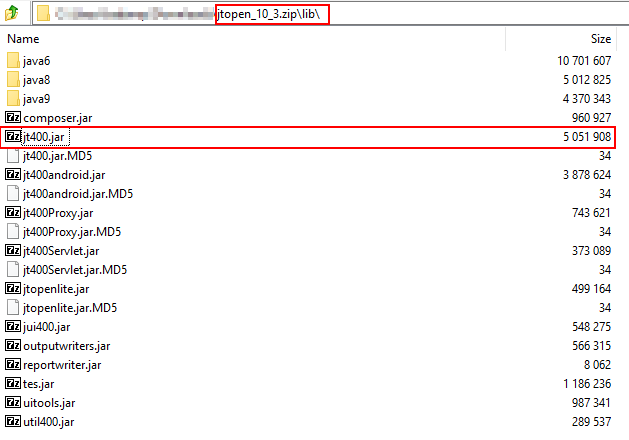
- Add the jar file to ACM by uploading via the admin console.
COL026