PagerDuty✓ Verified

 PagerDuty is an incident management platform that centralises alerts, on-call schedules, and escalation policies. Users are organised into Teams and assigned a system-level role that controls their access across the account. PagerDuty is an incident management platform that centralises alerts, on-call schedules, and escalation policies. Users are organised into Teams and assigned a system-level role that controls their access across the account.Identities ❌ | Accounts ✔️ | Groups ✔️ | App Roles ✔️ | Entitlements ❌ |
Permission Model
Teams
Teams organize users and control access to escalation policies, schedules, and services. A user can be a member of multiple teams.
User Roles
Each user is assigned exactly one system-level role controlling their access across the PagerDuty account.
| Role | Description |
|---|---|
owner | Account owner. Full access to all objects plus billing and subscription management. Only one per account. |
admin | Full access to all objects and configurations. Can manage users, teams, schedules, escalation policies, services, and integrations. |
user | Can view and edit most objects. Can acknowledge, resolve, and create incidents. |
limited_user | Can view most objects but cannot edit them. Can acknowledge incidents. |
observer | Can view objects but cannot make any modifications. |
read_only_user | Can view objects but cannot make any modifications. |
read_only_limited_user | Can only view objects they have been explicitly granted access to. |
restricted_access | Can only view incidents and alerts they are directly involved in. |
Application
Steps
- Login to RSA G&L console as System Administrator.
- Navigate to Resources > Application.
- Click on Create Application and select Other Application.
- Enter the details as shown below.
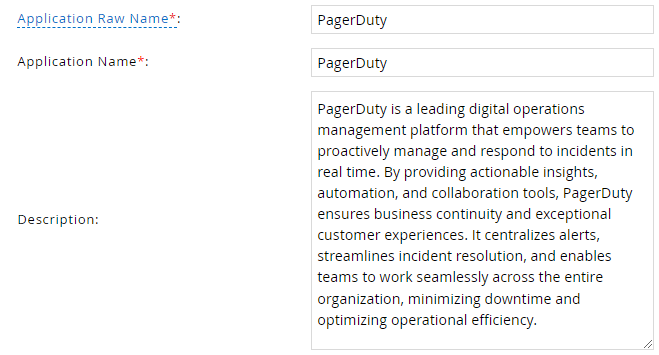
- Click Finish.
Account Collector
Uses the RSA G&L Generic REST collector 1.
Steps
- Login to RSA G&L console as System Administrator.
- Navigate to Resources > Applications.
- Click on PagerDuty.
- Navigate to Collectors tab and click on Create Account Collector. Enter the details as shown below.
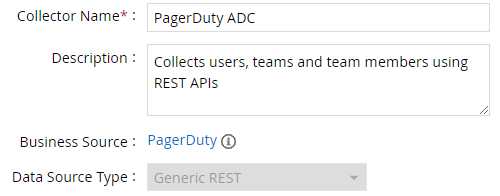
- Click Next and enter the connection details.
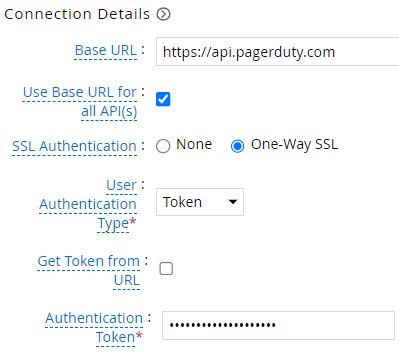
- Click Next. Select the data types that the collector will be collecting from PagerDuty

- Click Next. On the Account Data page, enter the following configurations.
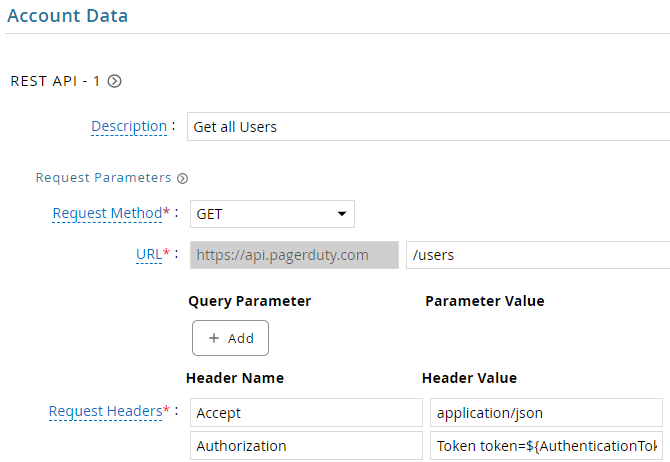
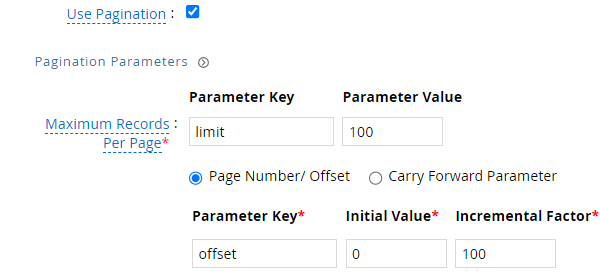
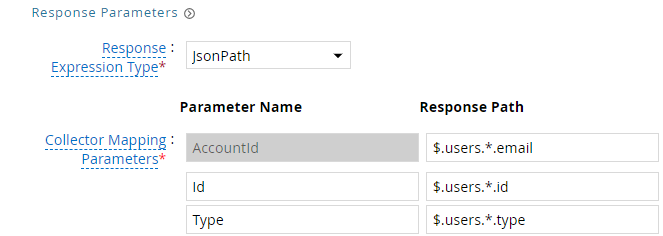
| Request | |
| Method | GET |
| URL | /users |
| Request Headers | |
| Accept | application/json |
| Authorization | Token token=${AuthenticationToken} |
| Response Mappings | |
| AccountId | $.users.*.email |
| Id | $.users.*.id |
| Type | $.users.*.type |
- Click Next. On the Group Data page, enter the following configurations.
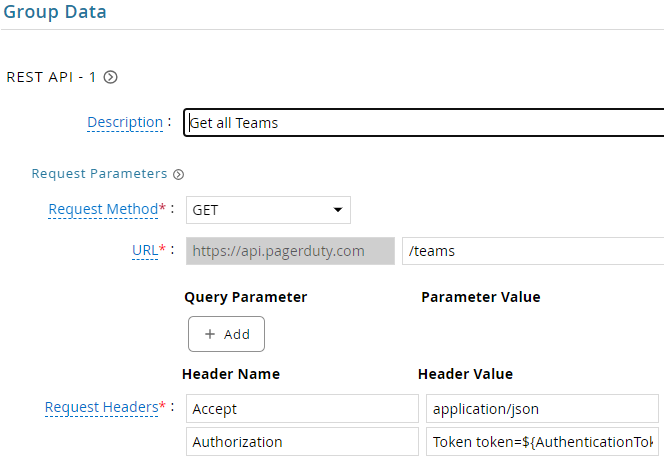
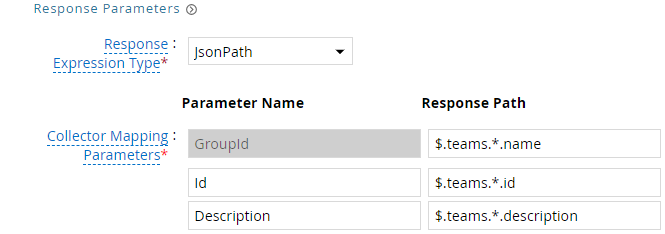
| Request | |
| Method | GET |
| URL | /teams |
| Query Parameters | |
| fields | id,name |
| Request Headers | |
| Accept | application/json |
| Authorization | Token token=${AuthenticationToken} |
| Response Mappings | |
| GroupId | $.teams.*.name |
| Id | $.teams.*.id |
| Description | $.teams.*.description |
- Click Next. On the Account Group Membership page, enter the following configurations.
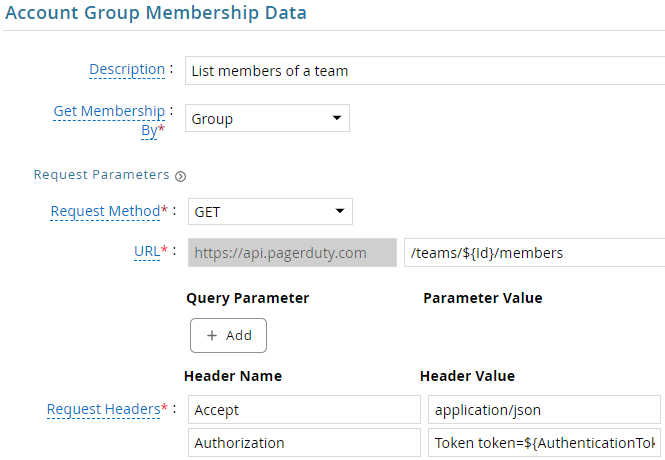

| Request | |
| Method | GET |
| URL | /teams/${Id}/members |
| Request Headers | |
| Accept | application/json |
| Authorization | Token token=${AuthenticationToken} |
| Response Mappings | |
| Account Identifier | $.members.*.user.id |
- Click Next. In the Map Collector Attributes to Account Attributes, map the collected account attributes.
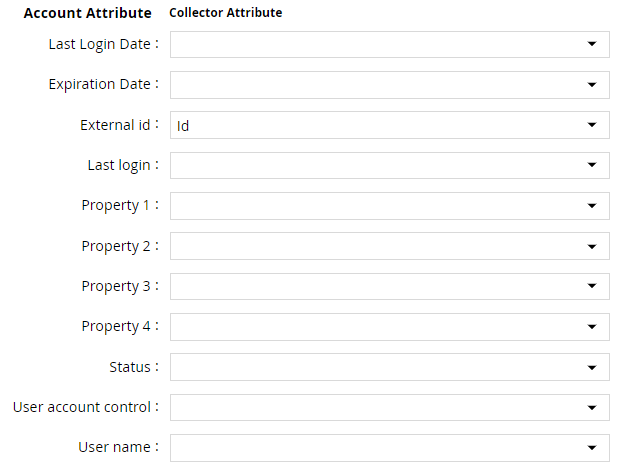
- Click Next. In the Map Collector Attributes to Account Mapping Attributes, map the user reference attribute.

- Click Next. In the Map Collector Attributes to Group Attributes, map the collected group attributes.

- Click Next. In the User Resolution Rules, map the user to account.

- Click Next. In the Member Account Resolution Rules, map the account.

This value MUST always be mapped to the Account Name for any generic REST collector.
- Click Finish. Use the
Testfunction to make sure the configurations are accurate.
Entitlement Collector
PagerDuty does not provide an API for listing user roles. A custom web service is used for the EDC. See Custom Web Service : User Roles.
Steps
- Login to RSA G&L console as System Administrator.
- Navigate to Resources > Applications.
- Click on PagerDuty.
- Navigate to Collectors tab and click on Create Entitlement Collector. Enter the details as shown below.
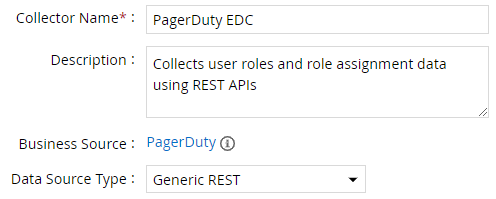
- Click Next and enter the connection details as shown in Step 5 of Account Collector. Use Base URL for all API(s) will be unchecked.
- Click Next. Select the data types that the collector will be collecting from PagerDuty.

- Click Next. On the App Role Data page, enter the following configurations.
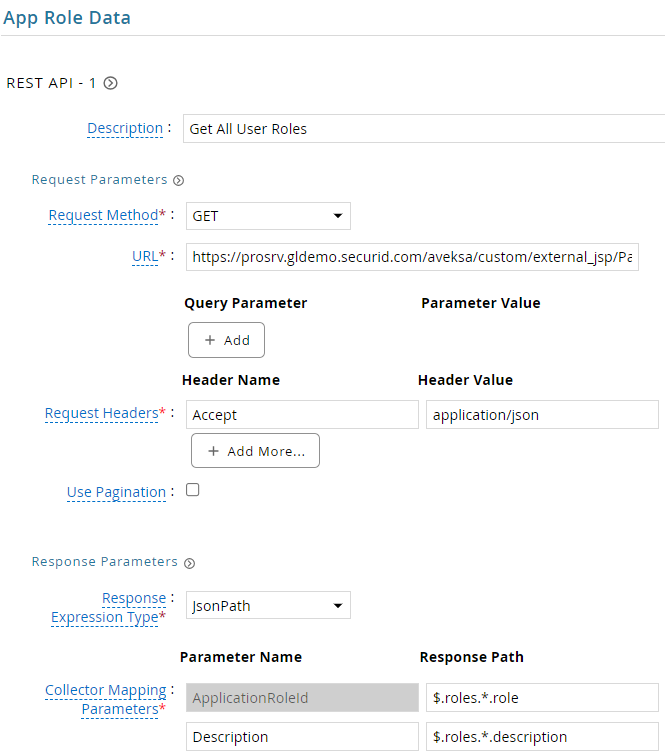
| Request | |
| Method | GET |
| URL | https://instance.securid.com/aveksa/custom/external_jsp/PagerDutyUserRolesv1.jsp |
| Request Headers | |
| Accept | application/json |
| Response Mappings | |
| ApplicationRoleId | $.roles.*.role |
| Description | $.roles.*.description |
- Click Next. On the App-Role Account Membership collection page, enter the following configurations.
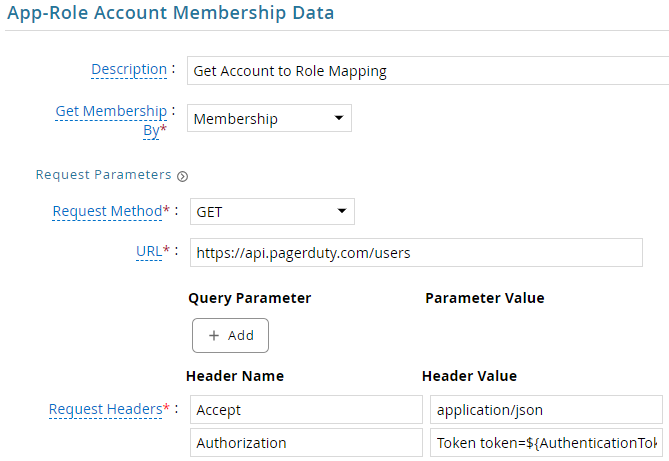
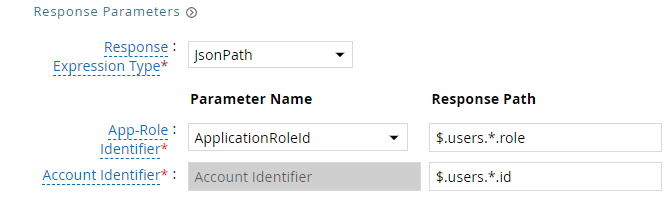
| Request | |
| Method | GET |
| URL | https://api.pagerduty.com/users |
| Request Headers | |
| Accept | application/json |
| Authorization | Token token=${AuthenticationToken} |
| Response Mappings | |
| Application Role Id | $.users.*.role |
| Account Identifier | $.users.*.id |
- Click Next. In the Map Collector Attributes to App Role Attributes, map the collected account attributes.

- Click Next. In the Account Evaluation, map the account collector to account value.

- Click Next and then click Finish. Use the
Testfunction to make sure the configurations are accurate.
Application Setup
Steps
- Login to PagerDuty console https://instance.pagerduty.com.
- Under Integrations, click on API Access Keys.

- Click on Create new API key.
- Provide a meaningful name. Since we are going to use this key for collections, check the Read-only API Key option.

- Click on Create Key.
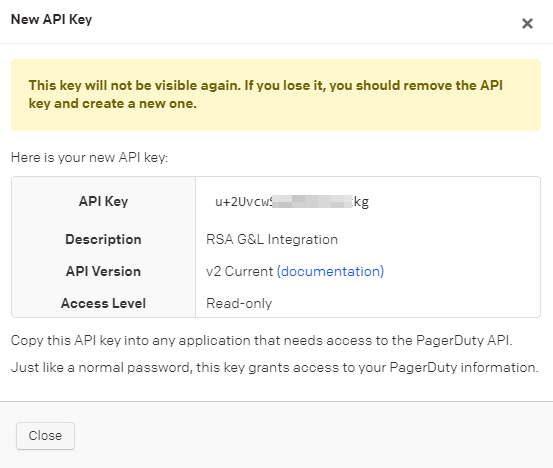
- Copy the Secret and click Done.
Custom Web Service
User Roles
Steps
- Open a text editor and save the contents below as
PagerDutyUserRolesv1.jsp
<%@ page language="java" contentType="application/json" %>
<%
    String jsonData = "{"
        + "\"roles\": ["
        + "{\"role\":\"admin\",\"description\":\"Has full access to all objects and configurations in the account. Can create, update, and delete users, teams, schedules, escalation policies, services, and integrations. Can also manage user permissions.\"},"
        + "{\"role\":\"limited_user\",\"description\":\"Can view most objects but cannot edit them. Can acknowledge incidents.\"},"
        + "{\"role\":\"observer\",\"description\":\"Can view objects, but cannot make any modifications.\"},"
        + "{\"role\":\"owner\",\"description\":\"Account owner. Full access to all objects plus billing and subscription management. Only one per account.\"},"
        + "{\"role\":\"read_only_user\",\"description\":\"Can view objects, but cannot make any modifications.\"},"
        + "{\"role\":\"restricted_access\",\"description\":\"Can only view incidents and alerts that they are directly involved in.\"},"
        + "{\"role\":\"read_only_limited_user\",\"description\":\"Can only view objects that they have been granted access to.\"},"
        + "{\"role\":\"user\",\"description\":\"Can view and edit most objects. Can acknowledge, resolve, and create incidents.\"}"
        + "]"
        + "}";
%>

<%
    response.setContentType("application/json");
    out.print(jsonData);
%>
- Login to RSA G&L console as System Administrator.
- Navigate to Admin > User Interface.
- Click on Files.
- Select External JSP Pages and click on Upload.
- Select the
PagerDutyUserRolesv1.jspand click OK. - Verify by accessing this URL in the browser https://instance.securid.com/aveksa/custom/external_jsp/PagerDutyUserRolesv1.jsp
API
List Users
API Reference : https://developer.pagerduty.com/api-reference/e960832de5a46-list-users
http GET /users
| API Field | RSA G&L Field | Notes |
|---|---|---|
users[].email | Account ID | Used as the primary account identifier |
users[].id | Id | PagerDuty internal user ID; used to join role assignments |
users[].type | Type | Always user |
users[].role | (see Role Assignments) | System role; also used in App-Role Account Membership |
users[].name | Display Name | Full name |
{
  "users": [
    {
      "id": "P1234AB",
      "type": "user",
      "name": "Jane Smith",
      "email": "jane.smith@example.com",
      "role": "user",
      "job_title": "On-Call Engineer",
      "time_zone": "America/New_York",
      "billed": true
    }
  ],
  "offset": 0,
  "limit": 25,
  "more": false,
  "total": 1
}
List Teams
API Reference : https://developer.pagerduty.com/api-reference/8d4e989c1c653-list-teams
http GET /teams?fields=id,name
| API Field | RSA G&L Field | Notes |
|---|---|---|
teams[].name | Group ID | Used as the group identifier in RSA G&L |
teams[].id | Id | PagerDuty internal team ID; used in the membership query |
teams[].description | Description | Team description |
{
  "teams": [
    {
      "id": "P3ZQXDF",
      "type": "team",
      "name": "Engineering",
      "description": "Core engineering team"
    },
    {
      "id": "P7ABCDE",
      "type": "team",
      "name": "Operations",
      "description": "Operations and SRE team"
    }
  ],
  "offset": 0,
  "limit": 25,
  "more": false,
  "total": 2
}
List Team Members
API Reference : https://developer.pagerduty.com/api-reference/e35802f3c4ba4-list-members-of-a-team
http GET /teams/{id}/members
| API Field | RSA G&L Field | Notes |
|---|---|---|
members[].user.id | Account Identifier | Joins to Account Collector id field |
members[].role | (informational) | Team-level role: responder, manager, observer. Separate from the account-level role in /users. |
{
  "members": [
    {
      "user": { "id": "PABC123", "type": "user_reference" },
      "role": "responder"
    },
    {
      "user": { "id": "PDEF456", "type": "user_reference" },
      "role": "responder"
    },
    {
      "user": { "id": "PGHI789", "type": "user_reference" },
      "role": "manager"
    }
  ],
  "limit": 100,
  "offset": 0,
  "more": false,
  "total": null
}
User Roles (Custom Web Service)
PagerDuty does not expose an API for listing available user roles. A custom JSP hosted on the RSA G&L server serves the static role catalogue. See Custom Web Service : User Roles for setup.
http GET https://instance.securid.com/aveksa/custom/external_jsp/PagerDutyUserRolesv1.jsp
| API Field | RSA G&L Field | Notes |
|---|---|---|
roles[].role | Application Role ID | Role identifier, e.g. admin, user, observer |
roles[].description | Description | Role description shown in access certifications |
{
  "roles": [
    { "role": "admin",      "description": "Full access to all objects and configurations." },
    { "role": "user",       "description": "Can view and edit most objects. Can acknowledge, resolve, and create incidents." },
    { "role": "observer",   "description": "Can view objects but cannot modify them." },
    { "role": "owner",      "description": "Account owner. Full access plus billing and subscription management." },
    { "role": "limited_user",           "description": "Can view most objects but cannot edit them. Can acknowledge incidents." },
    { "role": "read_only_user",         "description": "Can view objects but cannot modify them." },
    { "role": "read_only_limited_user", "description": "Can only view objects explicitly granted access to." },
    { "role": "restricted_access",      "description": "Can only view incidents and alerts they are directly involved in." }
  ]
}
Role Assignments
API Reference : https://developer.pagerduty.com/api-reference/e960832de5a46-list-users
http GET /users
The same /users endpoint is used for role assignment collection. Each user record carries their system role in the role field, giving the account-to-role mapping in a single pass.
| API Field | RSA G&L Field | Notes |
|---|---|---|
users[].role | Application Role ID | Joins to User Roles catalogue |
users[].id | Account Identifier | Joins to Account Collector id field |
{
  "users": [
    {
      "id": "P1234AB",
      "email": "jane.smith@example.com",
      "role": "user"
    },
    {
      "id": "P5678CD",
      "email": "bob.jones@example.com",
      "role": "admin"
    }
  ]
}
References
- PagerDuty REST API Reference
- PagerDuty API Authentication
- List users
- List teams
- List members of a team
COL008