Oracle PeopleTools (PeopleSoft)✓ Verified
· 4 min read

 Oracle PeopleTools is the development and runtime toolset for Oracle PeopleSoft applications such as HCM, CRM, and EPM. User profiles and roles are stored in the PeopleTools security tables. RSA G&L collects accounts and roles directly from these tables with a database collector. Oracle PeopleTools is the development and runtime toolset for Oracle PeopleSoft applications such as HCM, CRM, and EPM. User profiles and roles are stored in the PeopleTools security tables. RSA G&L collects accounts and roles directly from these tables with a database collector. Identities ❌ | Accounts ✔️ | Groups ❌ | App Roles ✔️ | Entitlements ❌ |
Application
Steps
- Login to RSA G&L console as System Administrator.
- Navigate to Resources > Application.
- Click on Create Application and select Other Application.
- Enter the details as shown below.

- Click Finish.
Account Collector
This section explains the process for configuring an account collector for the Oracle PeopleTools (PeopleSoft) application. We will use the SQL Server database collector for this purpose.
Steps
- Login to RSA G&L console as System Administrator.
- Navigate to Resources > Applications.
- Click on PeopleSoft.
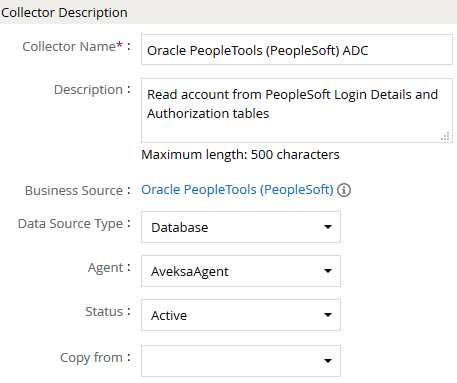
- Navigate to Collectors tab and click on Create Account Collector. Enter the details as shown below.
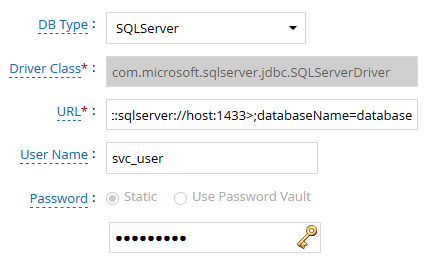
- Click Next and enter the PeopleSoft database details. Use Test Connection to make sure the connection details are accurate.
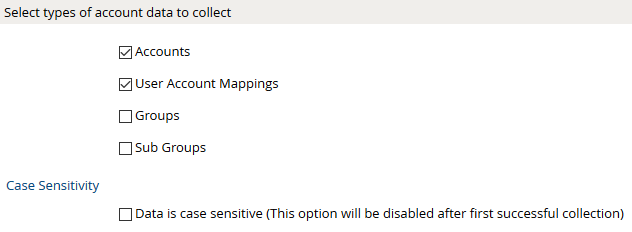
- Click Next. Select the appropriate data that you intend to collect. For the purpose of illustration we will collect accounts and user to account mapping from Oracle PeopleTools (PeopleSoft).
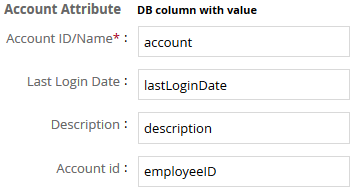
- Click Next. On the Account Data page, enter the following query to collect account information.
SELECT
  DISTINCT REPLACE(
    upper(OPRID),
    '''',
    ''
  ) AS account,
  EMPLID AS employeeID,
  OPRDEFNDESC AS description,
  LASTSIGNONDTTM AS lastLoginDate
FROM
  dbo.PSOPRDEFN
The following are the important attributes
- Click Next. On the User Account Mappings Data configuration page enter the following query to map the PeopleSoft account to user identity.
SELECT
  DISTINCT REPLACE(
    upper(OPRID),
    '''',
    ''
  ) AS account,
  EMPLID AS employeeID
FROM
  dbo.PSOPRDEFN
The following are the important attributes

- Click Next. In the User Resolution Rules, map the user to account

- Click Finish. Use the Test function to make sure the configurations are accurate.
Entitlement Collector
This section explains the process for configuring an entitlement collector to collect admin roles from Oracle PeopleTools (PeopleSoft) application. We will use the SQL Server database collector for this purpose.
Steps
- Login to RSA G&L console as AveksaAdmin.
- Navigate to Resources > Applications.
- Click on PeopleSoft.
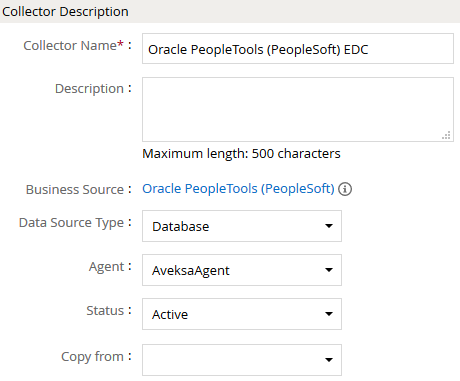
- Navigate to Collectors tab and click on Create Entitlement Collector. Enter the details as shown below.
- Click Next and enter the database connection details as shown in Step 5 of Account Collector.
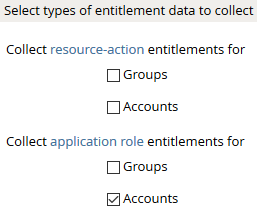
- Click Next. Select the data types that the collector will be collecting from PeopleSoft.
- Click Next. On the General Column Names, map the attribute names.
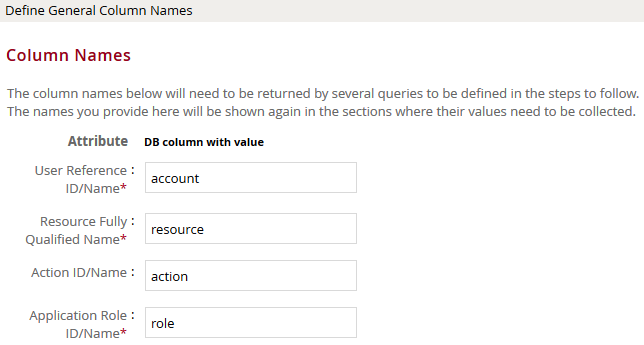
- Click Next. Under Application Role Data section, use the following query to collect admin roles from PeopleSoft.
SELECT
  DISTINCT ROLENAME AS role,
  DESCR AS description
FROM
  dbo.PSROLEDEFN
The following are the important attributes

- Click Next. On the Resource-Action Entitlements Data section, enter the query below to collect resource action mappings for roles.
SELECT
  DISTINCT ROLENAME AS role,
  CLASSID AS resource,
  '' AS action
FROM
  dbo.PSROLECLASS
union
SELECT
  DISTINCT '' AS role,
  CLASSID AS resource,
  '' AS action
FROM
  dbo.PSCLASSDEFN
WHERE
  CLASSID NOT IN(
    SELECT
      DISTINCT CLASSID
    FROM
      dbo.PSROLECLASS
  )
- Click Next. On the Account Data section, enter the query below to collect mappings for account to roles.
SELECT
  DISTINCT REPLACE(ROLEUSER, '''', '') AS account,
  ROLENAME AS role
FROM
  dbo.PSROLEUSER
- Click Next. In the User Evaluation, map the account to the ADC.
| Associated account collector | Account value evaluates to |
|---|---|
| Oracle PeopleTools (PeopleSoft) ADC | Account Name |
- Click Next and then click Finish. Use the Test function to make sure the configurations are accurate.
References
- PeopleSoft PeopleTools Documentation: Security Administration covers user profiles (
PSOPRDEFN), roles (PSROLEDEFN,PSROLEUSER), and permission lists (PSCLASSDEFN,PSROLECLASS). - Microsoft JDBC Driver for SQL Server
COL015